


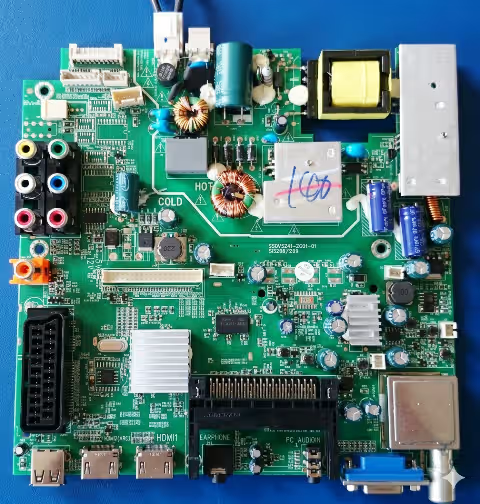
SSDV3241-ZCO1-01 Firmware Dump
MGS 19HD-SSDV411
SPI GD25Q64 Memory Repair | RT809H Programmer | Tested 100% Working
Firmware Overview
This page provides a verified and tested firmware dump for the SSDV3241-ZCO1-01 main board used in the MGS 19HD-SSDV411 television. The SPI flash dump targets the GD25Q64 memory chip and has been extracted and validated using the RT809H universal programmer. This firmware is intended exclusively for professional TV repair technicians who need to resolve memory-related failures on this specific board and model combination.
The MGS 19HD-SSDV411 is a 19-inch HD-ready LED television that utilizes the V185BJ1-PE1 display panel paired with the SSDV3241-ZCO1-01 main board. When the SPI flash memory becomes corrupted due to power surges, failed software updates, or component degradation, this firmware dump serves as the definitive repair solution to restore full operational functionality to the unit.
Technical Specifications
| Brand | MGS |
|---|---|
| Model | 19HD-SSDV411 |
| Main Board | SSDV3241-ZCO1-01 |
| Display Panel | V185BJ1-PE1 |
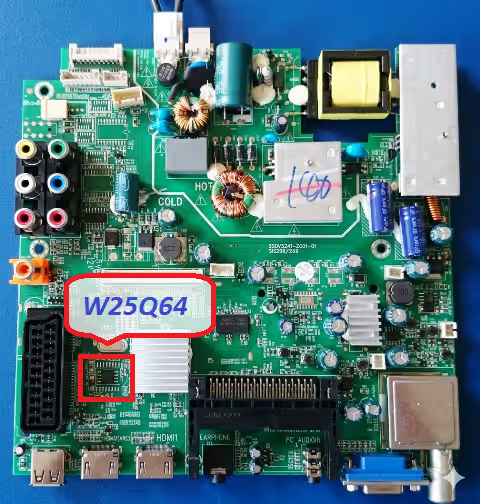
| SPI Flash IC | GD25Q64 (W25Q64 Compatible) |
| Memory Size | 64 Mbit (8 MB) |
| Programmer | RT809H Universal Programmer |
| Firmware Status | Tested 100% Working |
| File Format | .bin (Binary Dump) |
| Screen Size | 19 Inch HD Ready |
Board and SPI Chip Identification
Use the reference images below to verify the correct main board model number and SPI flash chip location before proceeding with the firmware flashing process. Click on each image to open a full-resolution view for detailed inspection.
Known Issues This Firmware Resolves
The following symptoms on the MGS 19HD-SSDV411 with the SSDV3241-ZCO1-01 main board indicate SPI memory corruption that this firmware dump is designed to repair:
Diagnostic and Repair Protocol
Required Tools and Equipment
Before beginning the firmware flashing procedure, ensure you have the following tools prepared and verified:
- RT809H Universal Programmer with latest software version installed
- SOP8 test clip or desoldering equipment (hot air station recommended at 350 degrees Celsius)
- Soldering iron with fine tip for rework
- Flux paste and solder wire
- Multimeter for continuity and voltage verification
- Anti-static wrist strap to prevent ESD damage
Step-by-Step Flashing Procedure
- Power Off and Discharge: Disconnect the TV from mains power. Wait a minimum of 30 seconds for all capacitors to fully discharge before handling any components on the main board.
- Locate the SPI Flash Chip: Identify the GD25Q64 chip on the SSDV3241-ZCO1-01 board using the reference image provided above. The chip is typically located near the main processor IC.
- Desolder or Connect via Clip: Carefully desolder the GD25Q64 using a hot air station at 350 degrees Celsius, or connect an SOP8 test clip directly to the chip while ensuring no other power sources are connected to the board.
- Insert into RT809H Programmer: Place the desoldered chip into the RT809H programmer ZIF socket with correct pin 1 orientation. If using an SOP8 clip, connect the clip cable to the programmer adapter.
- Detect and Erase: Open the RT809H software, auto-detect the chip as GD25Q64 (or select manually). Perform a complete chip erase operation and verify the erase was successful.
- Load Firmware File: Click the Open File button in the RT809H software and load the downloaded SSDV3241-ZCO1-01 firmware .bin file. Confirm the file size matches the expected 8 MB (8,388,608 bytes).
- Write and Verify: Execute the Write command to program the firmware data to the GD25Q64 chip. After writing completes, run the Verify function to confirm data integrity by comparing the chip contents against the source file.
- Resolder and Test: Resolder the programmed GD25Q64 chip back onto the SSDV3241-ZCO1-01 main board. Reconnect all cables and panel connections. Apply power and verify the TV boots successfully to the home screen with all functions operational.
Video Flashing Guide
Watch the complete step-by-step video tutorial demonstrating the firmware flashing process for the SSDV3241-ZCO1-01 main board on the MGS 19HD-SSDV411 television.
Download Firmware Dump
SSDV3241-ZCO1-01 SPI Firmware Dump
Verified binary dump for GD25Q64 memory chip. Compatible with RT809H programmer.
Click the download button. A sponsor page will open in a new tab first. Then the firmware file download will begin automatically. Please support our work by allowing the sponsor page to load completely.


