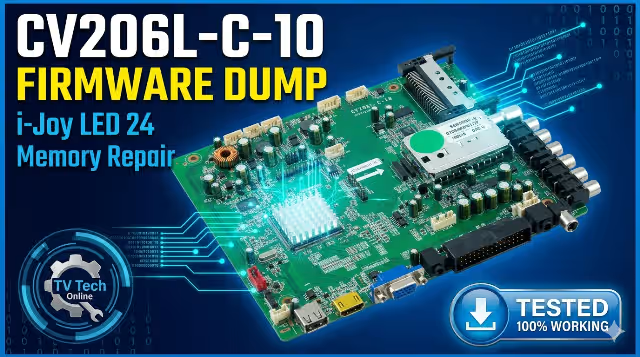
CV206L-C-10 Firmware Dump – i-Joy LED 24 TV Memory Repair Download
Tested & verified SPI flash dump for CV206L-C-10 main board. Fix all memory-related failures on i-Joy LED 24″ television. RT809H programmer method.
Main Board Overview – CV206L-C-10
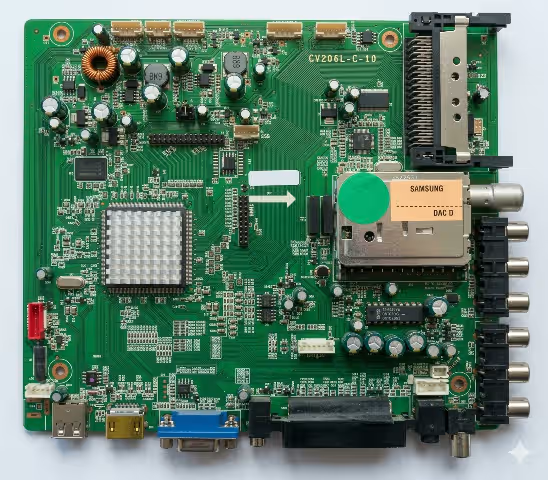
The CV206L-C-10 is a universal LED TV main board manufactured by ChipVision, commonly used in budget LED televisions including the i-Joy LED 24 model. This board integrates the main processor, memory controller, HDMI/USB interfaces, and audio processing into a single PCB solution. It supports panels up to 32 inches and is widely found in the European and Middle Eastern markets.
When the SPI flash memory becomes corrupted — due to power surges, failed software updates, or age degradation — the TV may exhibit a range of symptoms from complete failure to boot, to partial functionality loss. Reflashing the SPI memory with a known-good firmware dump is the standard repair procedure for these failures.
Technical Specifications
Below are the complete hardware specifications for this firmware dump. Verify all parameters match your board before flashing to prevent incompatibility damage.
| Main Board | CV206L-C-10 |
|---|---|
| TV Brand / Model | i-Joy LED 24 (24″ LED TV) |
| LCD Panel | M236L1WLSF1-B |
| SPI Flash IC | MX25L6405 (Macronix) |
| Flash Capacity | 64 Mbit (8 MB) |
| Programmer | RT809H Universal Programmer |
| Package Type | SOP-8 (8-pin) |
| Supply Voltage | 2.7V – 3.6V |
| Firmware Status | ✅ Tested 100% Working |
| File Type | Binary Dump (.bin) |
Important: This dump is specifically calibrated for the M236L1WLSF1-B LCD panel. If your TV uses a different panel model, you may need to adjust panel settings via the factory service menu after flashing, or source a panel-matched dump file.
SPI Flash Memory – MX25L6405
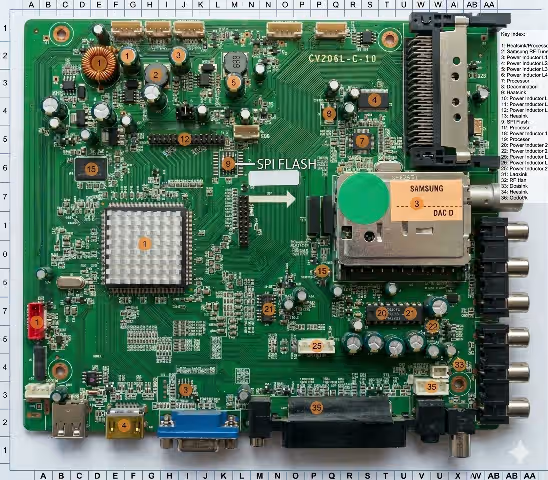
The Macronix MX25L6405 is a 64-Megabit (8 Megabyte) serial NOR flash memory chip in an SOP-8 package. This IC stores the complete TV firmware including the bootloader, operating system kernel, channel data, user settings, panel timing configuration, and EDID information.
MX25L6405 Key Parameters
| Manufacturer | Macronix International |
|---|---|
| Part Number | MX25L6405 / MX25L6406E |
| Memory Type | Serial NOR Flash |
| Capacity | 64 Mbit (8,388,608 bytes) |
| Interface | SPI (Serial Peripheral Interface) |
| Max Clock Speed | 86 MHz |
| Operating Voltage | 2.7V – 3.6V |
| Package | SOP-8 (150mil) |
| Endurance | 100,000 erase/program cycles |
| Data Retention | 20 years |
Tip: When using a SOP8 test clip for in-circuit programming, ensure you disconnect the main board from AC power and remove any connections to the panel. The test clip must make solid contact on all 8 pins. If reading fails, desolder the IC for reliable off-board programming.
Known Issues & Symptoms
The following symptoms on the i-Joy LED 24 TV with CV206L-C-10 main board indicate SPI flash memory corruption and can be resolved by reflashing with this firmware dump:
- Dead / No Power Response: TV shows no signs of life. Standby LED does not illuminate. Power supply is functional but main board fails to initialize due to corrupted bootloader sector.
- Stuck on Boot Logo: TV powers on, displays the i-Joy logo indefinitely but never reaches the home screen or TV input. Boot sequence hangs due to corrupted system partition.
- Backlight On, No Display: Screen illuminates (backlight visible) but no picture, no OSD menu. Panel timing data or LVDS configuration corrupted in memory.
- HDMI Ports Not Responding: All HDMI inputs show “No Signal” despite connected sources working on other TVs. HDMI EDID and HDCP data corrupted in flash memory.
- USB Multimedia Failure: TV does not detect USB drives or fails to play media files. USB controller initialization data corrupted.
- No Audio Output: Picture displays correctly but no sound from internal speakers or headphone jack. Audio codec configuration lost.
- OSD Menu Freezing / Glitching: On-screen display menu appears distorted, freezes, or causes TV to restart. UI resources corrupted in flash.
- Auto Channel Search Failure: TV tuner fails to scan or save channels. Tuner configuration and channel database area corrupted.
- Continuous Restart Loop: TV powers on, briefly shows display, then shuts off and restarts endlessly. Watchdog timer triggered by corrupted firmware execution.
Diagnostic & Repair Protocol
Follow this step-by-step repair protocol to successfully flash the CV206L-C-10 firmware dump onto the i-Joy LED 24 TV main board. Each step is critical — do not skip any procedure.
Required Tools & Equipment
| Programmer | RT809H Universal Programmer |
|---|---|
| Connection | SOP8 Test Clip or Desoldering Station |
| Software | RT809H Programmer Software (latest version) |
| Safety | ESD Wrist Strap, Insulated Work Mat |
| Additional | Multimeter, Isopropyl Alcohol, Flux |
Step-by-Step Flashing Procedure
- Disconnect AC Power Completely — Unplug the TV from the mains outlet. Press the power button for 10 seconds to discharge residual energy in capacitors. Wait a minimum of 30 seconds before proceeding.
- Open the TV Back Cover — Remove all screws from the rear panel. Carefully separate the back cover. Disconnect the speaker wires and any ribbon cables blocking access to the main board.
- Locate the MX25L6405 SPI Flash IC — Identify the 8-pin SOP package chip labeled MX25L6405 on the CV206L-C-10 board. It is typically located near the main processor. Note the pin 1 dot marker orientation.
- Connect to RT809H Programmer — Method A (In-Circuit): Attach the SOP8 test clip directly to the IC ensuring all 8 pins make contact. Method B (Off-Board): Desolder the IC using hot air station at 350°C and place in SOP8 adapter socket on the programmer.
- Launch RT809H Software & Detect Chip — Open RT809H programmer software on your PC. Click “Auto Detect” or manually select MX25L6405 from the Macronix chip database. Verify the chip ID reads correctly.
- Read & Backup Original Firmware — Click “Read” to extract the current (corrupted) firmware. Save this file as a backup (e.g.,
CV206L-C-10_original_backup.bin). This allows reverting if needed. - Erase the SPI Flash Chip — Click “Erase” to perform a full chip erase. Wait for the process to complete and verify the chip is blank. This removes all corrupted data sectors.
- Load the Downloaded Firmware Dump — Click “Open File” and select the downloaded CV206L-C-10 firmware dump .bin file. Verify the file size matches 8,388,608 bytes (8 MB) exactly.
- Write Firmware to Chip — Click “Write” to begin programming. The progress bar will indicate the flashing progress. Do not disconnect or interrupt the process. Typical write time is 2-4 minutes.
- Verify Written Data — Click “Verify” to compare the written data against the source file. The result must show 0 errors. If verification fails, repeat erase and write steps.
- Resolder IC (If Removed) — If the chip was desoldered, carefully resolder it back to the board with correct pin 1 orientation. Use flux and inspect all solder joints under magnification for bridges or cold joints.
- Reassemble & Power Test — Reconnect all cables and speakers. Secure the back cover. Plug in AC power and turn on the TV. The TV should boot normally to the home screen within 10-15 seconds.
Post-Flash Verification Checklist
- TV boots to home screen without freezing
- All HDMI inputs detect and display sources
- USB port reads and plays media files
- Audio output functional (speakers + headphone jack)
- OSD menu navigation smooth, no glitches
- Channel auto-scan completes successfully
- Remote control responds to all buttons
Video Repair Guide
Watch the complete video tutorial demonstrating the firmware flashing procedure for the CV206L-C-10 main board using the RT809H programmer:
Video covers: Board identification, SPI flash location, RT809H connection, chip reading, firmware writing, verification, and final power-on test results.
Download Firmware Dump
CV206L-C-10 — i-Joy LED 24 TV — MX25L6405 — RT809H — Verified 100% Working
File: CV206L-C-10_iJoy_LED24_MX25L6405.bin | Size: 8 MB | Format: .bin