

Overview
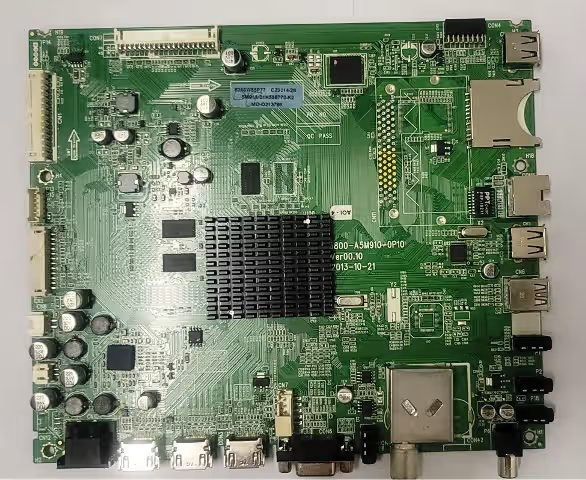
Download the 5800-A5M910-0P10 firmware dump for Supra STV-LC47S660FL00 and USB software update. Get access to the magic soft using a USB stick for update or SPI dump practice to resolve any memory issue on this main board.
This firmware has been tested and verified 100% working. Whether you need to reprogram the SPI flash via an RT809H programmer or perform a simple USB update, both methods are covered in this guide.
Firmware Specifications
| Main Board | 5800-A5M910-0P10 |
|---|---|
| TV Model | Supra STV-LC47S660FL00 |
| LCD Panel | LC470EUJ-SFK2 |
| SPI Flash | 25T16 (16 Mbit) |
| Programmer Method | RT809H / USB Update |
| Firmware Status | ✔ Tested 100% Working |
| File Format | .bin (SPI Dump) / .pkg (USB) |
| Last Updated | 09 May 2026 |
⚠ Known Issues for This Model
- No power / Dead set – Corrupted SPI firmware prevents boot sequence initialization
- Stuck on logo / Boot loop – Incomplete firmware update or power failure during flash
- No backlight – Faulty firmware timing values for LED driver initialization
- No signal on all inputs – HDMI/AV handler corruption in EEPROM data region
- Sound but no picture – T-CON initialization failure due to panel config mismatch
- Remote not responding – IR receiver configuration lost in memory corruption
- OSD menu freezes – Software exception caused by corrupt user data block
- Auto channel scan fails – Tuner firmware region damaged or overwritten
🔧 Diagnostic & Repair Protocol
- Visual Inspection – Check for burnt components, swollen capacitors, or cold solder joints on the main board
- Power Supply Test – Verify all voltage rails (5V, 12V, 24V) are within tolerance before firmware intervention
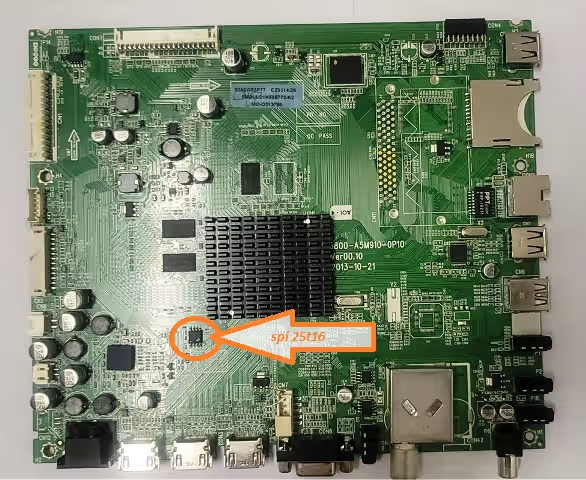
- Identify SPI Flash – Locate the 25T16 chip on the 5800-A5M910-0P10 board (see image above)
- Backup Original Dump – Always read and save the existing firmware before writing a new dump
- Flash Firmware – Use RT809H programmer: Erase → Blank Check → Program → Verify
- USB Method (Alternative) – Format USB to FAT32, copy .pkg file to root, insert and power on TV
- Post-Flash Verification – Confirm boot sequence, check all inputs, test OSD menu and remote functions
- EEPROM Reset – If issues persist after flash, perform factory reset via service menu
Video Tutorial
Watch the complete firmware flashing procedure for the 5800-A5M910-0P10 main board:
⬇ Download Firmware Files
Click once to support us, then click again to get your download link.
USB Software Update
SPI Dump 25T16
Frequently Asked Questions
The 5800-A5M910-0P10 main board uses a 25T16 SPI flash memory chip (16 Mbit) for firmware storage. This chip can be read and programmed using an RT809H or similar SPI programmer.
You can flash the firmware using either an RT809H SPI programmer connected directly to the 25T16 chip, or via USB update using a FAT32-formatted USB stick with the .pkg file copied to the root directory.
Yes. This firmware dump is specifically tested and verified 100% working on the Supra STV-LC47S660FL00 with LCD panel LC470EUJ-SFK2. Make sure your board revision matches before flashing.


