TP.MS3683B.PC821 Firmware Dump – MANTA 50LUN120D SPI 25Q64 Download
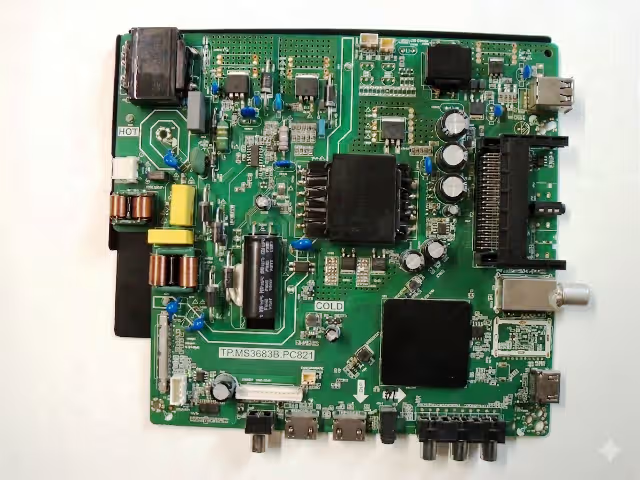
Get access to the TP.MS3683B.PC821 firmware dump for the MANTA 50LUN120D television. This magic SPI dump resolves any memory-related issue caused by corrupted EEPROM or flash IC data. The file has been extracted and verified for the 25Q64 SPI flash chip and is compatible with the CC500PV5D LCD panel configuration.
Firmware Specifications
| Brand | MANTA |
|---|---|
| Model | 50LUN120D |
| Main Board | TP.MS3683B.PC821 |
| LCD Panel | CC500PV5D |
| SPI Flash IC | 25Q64 (64Mbit / 8MB) |
| Programmer | RT809H / USB Update |
| File Type | SPI Full Dump (.bin) |
| Status | ✔ Tested 100% Working |
SPI Flash IC Location
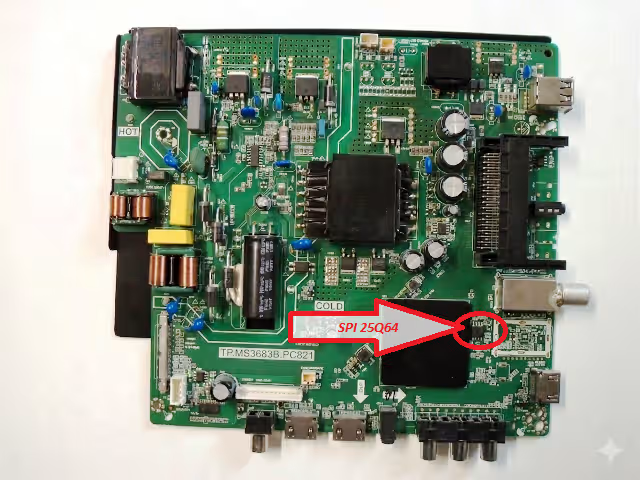
The 25Q64 SPI flash memory is located on the TP.MS3683B.PC821 main board as shown in the image below. Use the RT809H universal programmer with the correct SOP8 clip or socket adapter to read and write the firmware dump.
Common Issues – MANTA 50LUN120D
The following symptoms indicate SPI flash memory corruption on the TP.MS3683B.PC821 board and can be resolved by flashing this firmware dump:
- TV stuck on MANTA logo – boot loop during startup
- Completely dead TV – no power LED, no response after power surge
- Black screen with backlight ON – no OSD, no picture
- Audio present but no video output on screen
- No signal detected on all input sources (HDMI / AV / USB)
- Automatic restart loop – TV reboots every few seconds
- EEPROM data corruption – settings not saving, erratic behavior
- TV powers ON then immediately shuts OFF
- Firmware update failure – bricked after software update attempt
- OSD menu freezing or displaying garbled characters
Diagnostic & Repair Protocol
Follow this step-by-step repair protocol to successfully flash the firmware dump onto the TP.MS3683B.PC821 main board:
- Visual Inspection: Examine the TP.MS3683B.PC821 main board for burnt components, swollen capacitors, or damaged traces around the power supply and SPI flash area.
- Verify Power Rails: Measure standby voltage (3.3V / 5V) at the SPI flash IC and main processor. Confirm the power supply board outputs correct voltages before proceeding.
- Identify SPI Flash IC: Locate the 25Q64 chip on the board (refer to the SPI image above). Note the dot marking for pin 1 orientation.
- Backup Original Dump: Connect the RT809H programmer with SOP8 clip. Read and save the existing corrupted dump as a backup file before writing new data.
- Erase Flash Memory: Perform a full chip erase on the 25Q64 SPI IC using the RT809H software. Verify the erase operation completes with no errors.
- Write Firmware Dump: Load the downloaded TP.MS3683B.PC821 firmware .bin file into RT809H software. Write the file to the 25Q64 chip and verify after writing.
- USB Update Method (Alternative): Copy the firmware file to a FAT32-formatted USB drive. Insert into the TV USB port, power ON while holding the menu button to enter recovery mode.
- Post-Flash Verification: Reassemble and power ON the TV. Verify boot sequence, OSD menu access, all input sources, audio output, and panel display quality.
- Factory Reset: Perform a factory reset from the service menu to initialize all EEPROM settings to default values for the MANTA 50LUN120D configuration.
Video Tutorial
Download Firmware Dump
📦 TP.MS3683B.PC821 – SPI 25Q64 Full Dump
MANTA 50LUN120D | CC500PV5D Panel | Tested & Verified
Click once to proceed — then click again to get the file.