

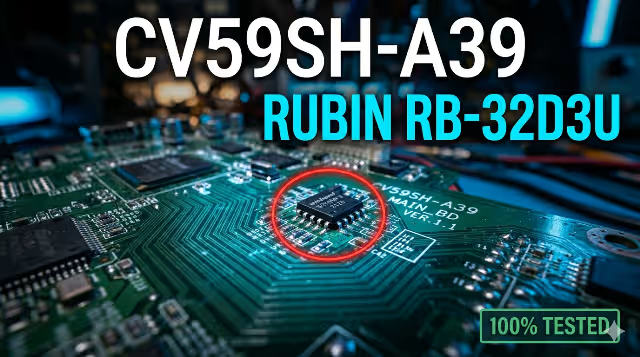
Firmware Dump
✔ 100% Tested
Technician Only
CV59SH-A39 RUBIN RB-32D3U
Firmware Dump Download
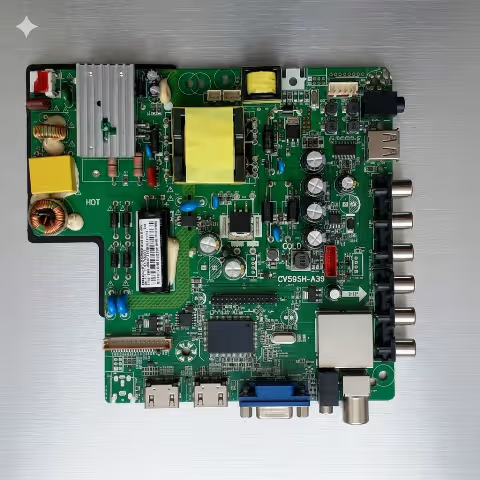
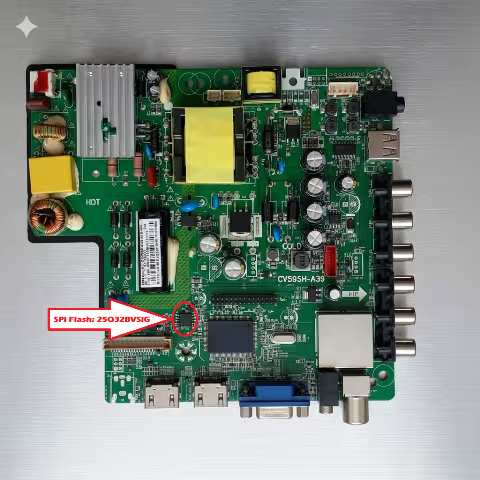
Main Board CV59SH-A39 • Panel CX315DLEDM • SPI Flash 25Q32BVSIG
FOR PROFESSIONAL TECHNICIANS ONLY — This firmware dump requires an SPI programmer (RT809H) and technical expertise. Incorrect flashing may permanently damage the TV. Proceed at your own risk.
Firmware Specifications
| TV Brand & Model | RUBIN RB-32D3U |
| Main Board | CV59SH-A39 |
| Display Panel | CX315DLEDM |
| SPI Flash IC | 25Q32BVSIG (W25Q32BVSIG) |
| Flash Size | 32 Mbit (4 MB) |
| Package Type | SOP-8 / SOIC-8 |
| Programmer | RT809H |
| Programming Method | SPI – SOIC8 Test Clip / Direct Solder |
| File Type | BIN (Full Memory Dump) |
| Status | ✔ Tested & 100% Working |
Main Board & SPI Chip Reference
Common Issues – CV59SH-A39 / RUBIN RB-32D3U
This firmware dump resolves the following symptoms caused by corrupted or damaged SPI flash memory data:
- Dead TV — No Standby LED: Power supply OK, but the main board does not initialize. No standby light, no response to remote or power button.
- Standby Only — No Power On: Red standby LED is on but the TV does not turn on. Relay does not click. Main board fails to send power-on command.
- Boot Loop / Auto Restart: TV turns on, shows logo briefly, then restarts in an endless cycle. Corrupted boot sector in SPI flash.
- Stuck on Logo Screen: TV powers on and displays the manufacturer logo but never reaches the main menu or input selection screen.
- Backlight On, No Display (No OSD): Screen lights up with backlight but no picture, no on-screen display. T-CON and panel are fine — firmware issue.
- HDMI / AV Inputs Not Working: TV turns on but does not detect or display signal from any input source. Input configuration corrupted in memory.
- No Audio Output: Picture displays correctly but there is no sound. Speaker and audio amplifier test OK — EEPROM audio settings corrupted.
- OSD Menu Glitch / Frozen Settings: On-screen menu appears corrupted, settings cannot be changed, or the menu freezes. Firmware data integrity compromised.
- Software Update Failure: Previous firmware update via USB was interrupted or failed, leaving the SPI flash in a partially written, non-bootable state.
Diagnostic & Repair Protocol
-
Visual Inspection Inspect the CV59SH-A39 main board for burnt components, swollen capacitors, cracked solder joints, and physical damage to the 25Q32BVSIG chip.
-
Power Supply Verification Confirm PSU outputs: 5V Standby, 12V Main, 3.3V logic rail. All voltages must be within ±5% tolerance before proceeding with firmware work.
-
Backup Original SPI Data Connect RT809H via SOIC8 clip to the 25Q32BVSIG chip. Read the original flash content and save it as a backup .BIN file before any write operation.
-
Erase SPI Flash Chip Perform a full chip erase in the RT809H software. Verify the chip is completely blank (all 0xFF) before writing new firmware.
-
Download & Load Firmware File Download the tested firmware dump file from this page. Open it in RT809H software and confirm file size matches chip capacity (4MB / 32Mbit).
-
Write Firmware to Chip Flash the firmware to the 25Q32BVSIG using the RT809H. Do not interrupt the process. Writing should complete without errors.
-
Verify Written Data Use the RT809H verify function to compare written data against the original firmware file. A 100% match confirms a successful write.
-
Reassemble & Test Disconnect the programmer. Reassemble the TV. Power on and verify: standby LED, boot sequence, display output, OSD menu, all inputs (HDMI/AV/USB), audio output, and remote control response.
Video Tutorial
Download Firmware Dump
CV59SH-A39 — RUBIN RB-32D3U — 25Q32BVSIG — Full SPI Memory Dump
Board: CV59SH-A39
Flash: 25Q32BVSIG
Size: 4 MB
Type: .BIN
1 Click to confirm
2 Get download link
File is verified and scanned. 100% clean firmware dump.


