 Firmware Dump
✔ TESTED 100% WORKING
Firmware Dump
✔ TESTED 100% WORKING
Blaupunkt MCD Radio Navigation System – Firmware Dump, Code Unlock & FIS Memory Repair Guide
Overview
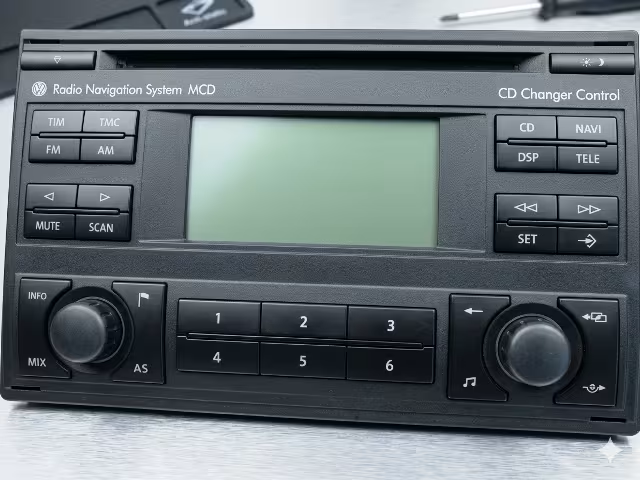
The Blaupunkt MCD Radio Navigation System is a factory-fitted head unit found in various European vehicles. When the unit is disconnected from the battery or encounters a power fault, it activates its anti-theft code lock, rendering the radio unusable until the correct security code is entered.
Unlike most car radios that store the security code in a removable EEPROM chip (such as 24C02 or 24C08), the Blaupunkt MCD unit does not have a standard standalone EEPROM. Instead, the code is stored within the FIS (Frequency Information System) memory, which can be interfaced and read as a 24C32 EEPROM using the appropriate programmer and wiring configuration.
Unit Specifications
| Parameter | Details |
|---|---|
| Brand | Blaupunkt |
| Model | MCD Radio Navigation System |
| Type | Car Radio / Navigation Head Unit |
| EEPROM Type | None (uses FIS memory as 24C32) |
| Memory Interface | FIS – read/write as 24C32 EEPROM |
| Programmer | TL866 II Plus (MiniPro) |
| Unlock Code (this dump) | 1451 |
| Firmware Status | ✔ Tested 100% Working |
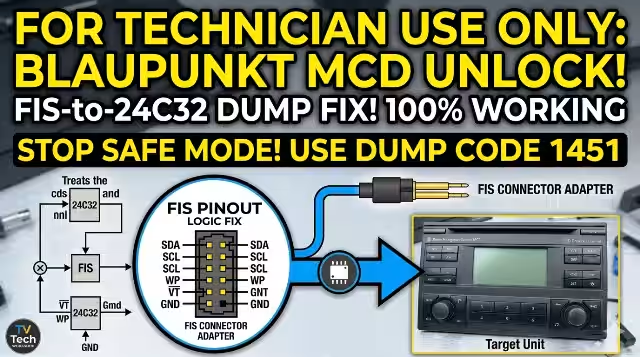
FIS Memory Pinout Diagram
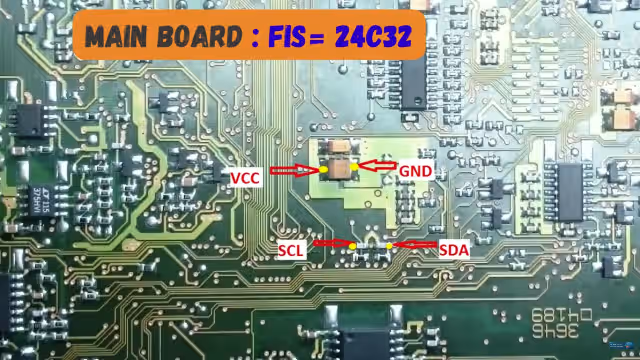
Since the Blaupunkt MCD does not feature a conventional EEPROM, you must connect directly to the FIS memory chip on the PCB. Below is the pinout reference for interfacing the FIS as a 24C32 EEPROM:
FIS to 24C32 Pin Mapping
| Pin | Function | 24C32 Equivalent | Wire Color (typical) |
|---|---|---|---|
| 1 | A0 (Address) | Pin 1 | Black |
| 2 | A1 (Address) | Pin 2 | Brown |
| 3 | A2 (Address) | Pin 3 | Red |
| 4 | GND | Pin 4 (VSS) | Black |
| 5 | SDA (Data) | Pin 5 | Green |
| 6 | SCL (Clock) | Pin 6 | Yellow |
| 7 | WP (Write Protect) | Pin 7 | Blue |
| 8 | VCC (+5V) | Pin 8 | Red |
Programming Method – TL866 II Plus
The TL866 II Plus (also known as MiniPro) is a universal programmer capable of reading and writing numerous memory IC types including I²C EEPROMs. To read the FIS memory from the Blaupunkt MCD, configure the programmer as follows:
Step-by-Step Procedure
- Disassemble the radio: Remove the Blaupunkt MCD unit from the vehicle dashboard. Unscrew the metal casing to expose the main PCB.
- Locate the FIS memory: Identify the FIS chip on the board. It is typically a small 8-pin SOIC package. Refer to the pinout diagram above.
- Prepare the programmer: Connect the TL866 II Plus to your computer. Open the Xgpro software.
- Select device: In Xgpro, search for and select ATMEL AT24C32 (or equivalent 24C32) from the device list.
- Wire the FIS to the programmer: Using the pinout above, connect the FIS memory pins to the TL866 II Plus ZIF socket or SOIC8 clip adapter.
- Read the chip: Click “Read” in Xgpro. The software will read 4096 bytes (4KB) from the FIS memory.
- Save the dump: Save the read data as a
.binfile for backup and analysis. - Extract the code: The radio security code is embedded within the dump data. For this specific unit, the code is 1451.
- Write (if needed): If restoring a corrupted dump, load the known-good firmware file and click “Write”.
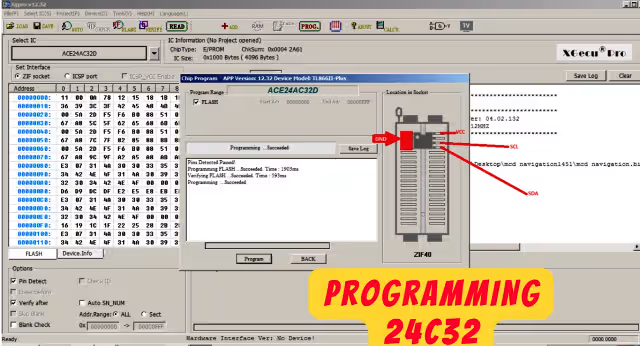
Xgpro Software Settings
Package: DIP8 / SOIC8 (via adapter)
VCC: 5.0V
Interface: I²C
Size: 4096 bytes (4KB)
Address: A0 = 0, A1 = 0, A2 = 0
Operation: Read → Save → Analyze
Common Issues & Known Problems
Technicians frequently encounter the following issues with the Blaupunkt MCD Radio Navigation System:
1. Radio Code Lock (SAFE Mode)
After battery disconnection or replacement, the radio displays “SAFE” and requires a 4-digit security code. Without the code, the unit is completely locked. If the wrong code is entered multiple times, the radio enters a timed lockout (typically 1–2 hours before another attempt).
2. No Standard EEPROM Found
Technicians expecting a conventional 24C02/24C08 EEPROM will not find one on the Blaupunkt MCD PCB. The code is stored in the FIS memory, which must be wired and read as a 24C32. This is a common point of confusion.
3. FIS Memory Read Errors
- Blank or 0xFF read: Check VCC and GND connections. Ensure the chip is receiving stable 5V power.
- Checksum errors: Verify SCL and SDA wiring. Poor solder joints cause intermittent data corruption.
- Device not detected: Confirm the correct device (24C32) is selected in Xgpro. Check that the SOIC8 clip has proper contact with all pins.
4. Navigation System Malfunction
If the navigation module fails to load maps or shows a blank screen after reassembly, the FIS memory may have been partially corrupted during a read/write operation. Restore from a known-good backup dump.
5. Display Backlight Failure
Some MCD units suffer from backlight inverter failure, resulting in a dark screen even though the radio functions normally (audio still works). This is a hardware issue unrelated to the EEPROM/FIS memory.
6. CD/Navigation Disc Read Errors
The laser assembly can degrade over time, causing the unit to fail reading navigation CDs. Symptoms include repeated “Please insert CD” messages or navigation data loading errors.
Diagnostic & Repair Protocol
Follow this systematic diagnostic protocol when servicing a Blaupunkt MCD Radio Navigation System:
Phase 1: Visual Inspection
- Remove the unit and inspect the exterior for physical damage, water ingress, or burned connector pins.
- Open the casing and examine the PCB for cold solder joints, burnt components, bulging capacitors, or corrosion.
- Check the FIS memory chip for physical damage (cracked package, lifted pins).
Phase 2: Power Supply Verification
- Verify +12V permanent (Battery) and +12V ACC (Ignition) supply at the connector.
- Check internal voltage regulators — measure 5V and 3.3V rails on the PCB with the unit powered on.
- Test the fuse (if present) on the main power input line.
Phase 3: Memory Diagnostics
- Connect to the FIS memory using the pinout and TL866 II Plus as described above.
- Perform a full read of the 24C32 (4KB). If the read returns all
0xFFor all0x00, the memory is likely corrupted or the connection is faulty. - Compare the dump against a known-good reference file if available.
- If data appears valid, extract the 4-digit code from the appropriate offset location.
Phase 4: Code Entry & Verification
- Reassemble the radio and connect it to a bench power supply (12V, 3A minimum).
- Power on and wait for the “SAFE” prompt.
- Enter the extracted code using the preset buttons (buttons 1–4 correspond to digits).
- If accepted, the radio will display the frequency band and resume normal operation.
Phase 5: Firmware Restoration (If Needed)
- If the FIS memory is corrupted and no backup exists, use the tested firmware dump provided below.
- Load the dump file into Xgpro and write it to the FIS memory configured as 24C32.
- After writing, perform a verify operation to confirm data integrity.
- Power on the unit and enter the code 1451 (associated with this specific dump).
Repair Checklist Summary
| Check Item | Status | Action |
|---|---|---|
| SAFE Code Lock | Common | Read FIS → Extract Code |
| FIS Memory Corruption | Occasional | Write Known-Good Dump |
| No Display / Backlight | Hardware | Replace Inverter / CCFL |
| No Power | Check Supply | Test 12V + Fuse + Regulators |
| CD Read Failure | Wear | Clean / Replace Laser Assembly |
| Navigation Load Error | Data | Verify Disc + FIS Integrity |
Video Tutorial
Watch the complete walkthrough of the Blaupunkt MCD code unlock procedure, including FIS memory reading and TL866 II Plus configuration:
Download Firmware Dump
Blaupunkt MCD Radio Navigation System – FIS Memory Dump (24C32 Format)
Unlock Code: 1451 | Size: 4 KB | Format: .bin
Click once to proceed → then click again to download the file