

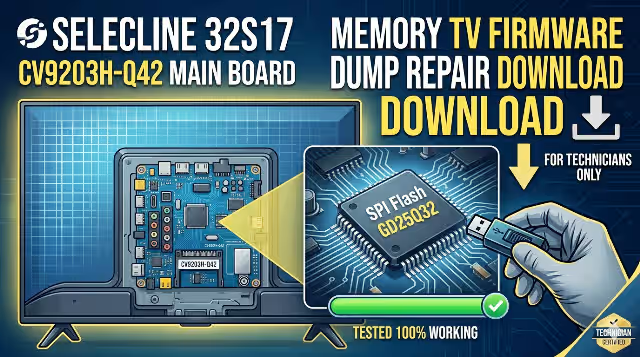
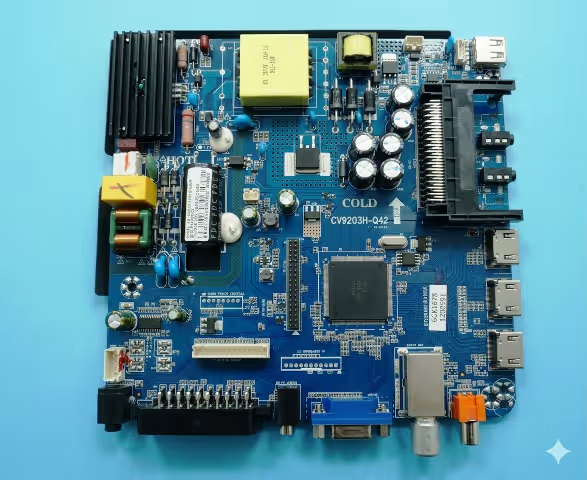
CV9203H-Q42 Firmware Dump – Selecline 32S17 TV
SPI Flash GD25Q32 Memory Repair File | Tested 100% Working | Published: June 1, 2026
Firmware Overview
This page provides the tested and verified SPI flash dump for the Selecline 32S17 television equipped with the CV9203H-Q42 main board. The firmware binary file is intended exclusively for professional TV repair technicians who need to resolve memory-related failures by reprogramming the GD25Q32 SPI flash chip using an RT809H universal programmer.
The dump has been extracted from a fully functional unit, verified for data integrity, and confirmed 100% working after flashing onto replacement and existing memory chips. If your Selecline 32S17 is experiencing boot loops, no-start conditions, or corrupted OSD, this firmware file is the solution you need.
Technical Specifications
| Brand | Selecline |
| Model | 32S17 |
| Main Board | CV9203H-Q42 |
| Panel | LSC320AN10 |
| SPI Flash IC | GD25Q32 (32Mbit / 4MB) |
| Programmer | RT809H |
| File Format | .bin (Raw Binary Dump) |
| File Size | 4 MB (4,194,304 bytes) |
| Status | Tested 100% Working |
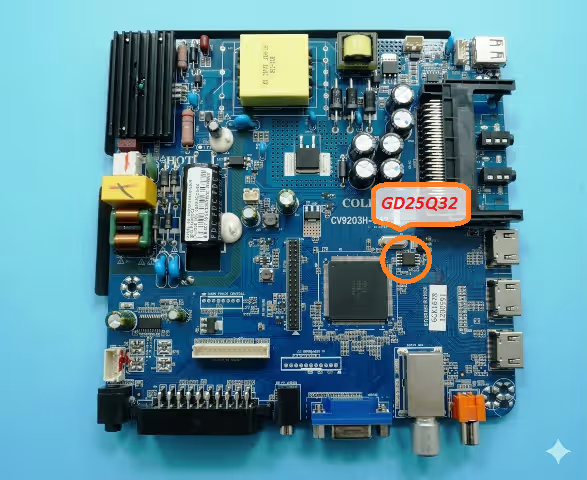
SPI Flash IC Location
Locate the GD25Q32 SPI flash memory chip on the CV9203H-Q42 main board. The chip is an 8-pin SOIC package typically found near the main processor. Refer to the image below for the exact position before desoldering or using an in-circuit clip.
Common Issues Resolved by This Firmware
The following symptoms on the Selecline 32S17 (CV9203H-Q42) are typically caused by corrupted or failed SPI flash memory and can be resolved by reprogramming the GD25Q32 chip with this dump:
- TV Dead / No Power Response – Standby LED does not light up; main board does not initialize due to corrupted boot sector in SPI memory.
- Stuck on Boot Logo / Boot Loop – TV powers on but freezes on the startup logo or continuously restarts without reaching the home screen.
- Backlight On, No Picture, No OSD – The backlight activates but no image or on-screen display appears, indicating main firmware corruption.
- No Signal on All Inputs – All source inputs (HDMI, AV, USB, TV) display “No Signal” despite functional external devices.
- OSD Menu Corruption / Garbled Text – On-screen menu shows distorted characters, missing options, or scrambled language settings.
- Sound Present but No Display – Audio output works correctly but the screen remains black, pointing to a firmware rendering fault.
- Software Update Failure – A failed USB software update has bricked the TV, leaving the system unbootable.
- Channel Scan Failure / Tuner Not Working – The TV cannot detect or store channels after auto-scan, caused by corrupted tuner configuration data in memory.
- Remote Control Not Responding – IR commands are ignored by the main board despite a functional remote and IR sensor.
- HDMI Ports Not Detecting Devices – Connected HDMI devices are not recognized; HDMI handshake fails due to corrupted EDID or firmware data.
Diagnostic and Repair Protocol
Follow this step-by-step protocol to diagnose the SPI memory fault and successfully reprogram the GD25Q32 chip on the CV9203H-Q42 main board:
Video Repair Guide
Watch the complete firmware dump and flashing procedure for the CV9203H-Q42 main board. This tutorial demonstrates the full repair process from chip removal to successful boot verification.
Download CV9203H-Q42 SPI Firmware Dump
GD25Q32 Binary File – Selecline 32S17 – 4MB – Tested 100% Working
Step 1 : Unlock Download LinkStep 2 : Download SPI Firmware File
Click “Unlock Download Link” first, then the download button will appear. For technician use only.
Share This Firmware
Related Firmware Dumps
Frequently Asked Questions
What SPI flash chip does the Selecline 32S17 use?
The Selecline 32S17 with the CV9203H-Q42 main board uses a GD25Q32 (32Mbit / 4MB) SPI NOR flash memory chip in an 8-pin SOIC package.
Which programmer is required for the CV9203H-Q42 firmware dump?
The RT809H universal programmer is the recommended tool for reading and writing the SPI flash dump. It supports the GD25Q32 chip natively through its software database.
Is this firmware dump tested and working?
Yes, this firmware dump has been tested 100% working on the Selecline 32S17 TV with panel LSC320AN10 and CV9203H-Q42 main board. It was verified through read-write-verify cycle on the RT809H programmer.
Can I use this dump with a different panel?
This dump is configured specifically for the LSC320AN10 panel. Using it with a different panel model may result in display issues such as inverted colors, incorrect resolution, or no picture. Always verify panel compatibility before flashing.
Do I need to desolder the SPI chip or can I flash in-circuit?
Desoldering is recommended for the most reliable results. However, you can attempt in-circuit programming using a SOIC-8 test clip connected to the RT809H. Ensure the board is completely powered off and disconnected from mains power during in-circuit flashing.


