Firmware Overview
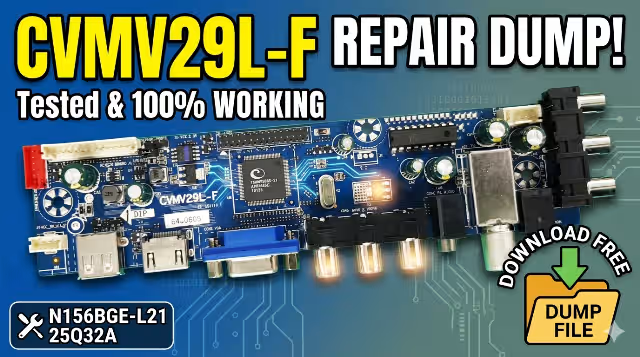
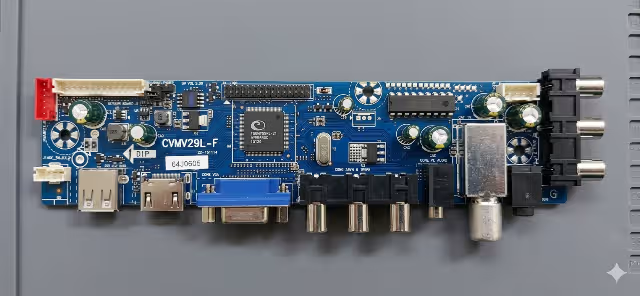
This page provides a free firmware dump download for the CVMV29L-F main board used in the Dexp H16B3000 television. The dump file is extracted directly from the 25Q32A SPI flash memory chip and has been tested and verified 100% working on a live unit. This firmware repair file is intended for professional TV technicians who need to restore bricked, dead, or malfunctioning Dexp H16B3000 TVs by reprogramming the EEPROM memory using an RT809H universal programmer.
The CVMV29L-F is a widely used universal LED TV main board found across multiple TV brands. When the SPI flash chip becomes corrupted—due to power surges, failed software updates, or component failure—the TV may exhibit a range of symptoms from boot loops to a completely dead state. Reflashing the memory with a known-good dump restores the TV to its original factory operating condition.
Hardware Specifications
| Main Board | CVMV29L-F |
|---|---|
| TV Model | Dexp H16B3000 |
| LCD Panel | N156BGE-L21 |
| SPI Flash IC | Winbond 25Q32A (W25Q32) |
| Flash Size | 32 Mbit (4 MB) |
| Programmer | RT809H Universal Programmer |
| Dump Format | Binary (.bin) |
| Firmware Status | ✅ Tested 100% Working |
| Resolution | 1366 × 768 (HD) |
| Panel Type | 15.6″ LED WXGA |
SPI Flash Chip Location Index
The image below shows the exact location of the W25Q32A SPI flash memory chip on the CVMV29L-F main board. Identify this IC before desoldering or using an in-circuit clip with your RT809H programmer.
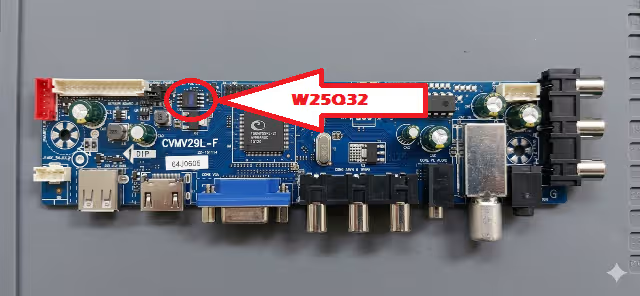
Ensure pin 1 orientation is correctly aligned when reseating the chip. Incorrect placement will result in read/write errors or permanent IC damage.
Common Issues & Symptoms
The following issues on the Dexp H16B3000 (CVMV29L-F) are typically resolved by reflashing the SPI memory dump:
- TV is completely dead — no standby LED, no response to power button or remote
- Stuck on boot logo — TV powers on but freezes at the Dexp splash screen
- Continuous reboot loop — TV restarts repeatedly without reaching the home screen
- Backlight turns on but no picture or OSD — screen stays blank with faint glow
- No signal on all inputs — HDMI, AV, and USB ports show “No Signal” error
- Sound works but no display — audio output is present while screen remains black
- OSD menu is corrupted or garbled — on-screen text appears distorted or unreadable
- Software update failure — TV bricked after interrupted firmware update via USB
- EEPROM data corruption after power surge or lightning strike
- Channel scan and tuner malfunction — unable to detect or store TV channels
Diagnostic & Repair Protocol
Step 1 — Visual Inspection
Before flashing firmware, perform a thorough visual inspection of the CVMV29L-F main board. Check for burnt components, swollen capacitors, cracked solder joints, and damaged traces around the power supply section and SPI flash area.
Step 2 — Verify Power Supply Rails
Measure all voltage outputs from the power supply board to ensure correct values reach the main board. Confirm 5V, 3.3V, and 12V rails are within tolerance. A faulty power supply can mimic firmware corruption symptoms.
Step 3 — Identify the SPI Flash IC
Locate the Winbond W25Q32A (25Q32) SPI flash chip on the CVMV29L-F board using the index image above. The chip is an 8-pin SOP8 package typically located near the main processor.
Step 4 — Read the Original Dump (Backup)
Using your RT809H programmer, connect to the 25Q32A chip either by desoldering or using an SOP8 test clip. Read the current flash contents and save a backup copy before proceeding.
Step 5 — Erase the SPI Flash
Perform a full chip erase operation in the RT809H software. Verify the erase is successful by confirming all bytes read as 0xFF.
Step 6 — Write the Firmware Dump
Load the downloaded CVMV29L-F firmware dump file (.bin) into the RT809H software. Write the file to the 25Q32A chip. After writing, perform a verify operation to confirm the data matches the source file exactly.
Step 7 — Reassemble & Test
Resolder the SPI flash chip (if removed) and reassemble the TV. Power on the unit and verify the following:
- Standby LED lights up and the TV responds to the power button
- Boot logo appears and the TV reaches the home screen successfully
- OSD menu displays correctly without corruption or artifacts
- All input sources (HDMI, AV, USB) function as expected
- Channel scan completes and stores channels correctly
- Audio output works on built-in speakers and headphone jack
- Remote control commands are recognized properly
Important: This firmware dump is exclusively for the Dexp H16B3000 with CVMV29L-F main board and N156BGE-L21 LCD panel. Using this file on a different board revision, TV model, or panel type may cause permanent hardware damage. Always verify your exact hardware configuration before flashing. For professional technician use only.
Video Guide — CVMV29L-F Firmware Repair
Watch the complete step-by-step guide on how to desolder, read, erase, write, and verify the 25Q32A SPI flash chip on the CVMV29L-F main board using the RT809H programmer.
⬇ Download Firmware Dump
CVMV29L-F — Dexp H16B3000 — W25Q32A — Binary (.bin)
Frequently Asked Questions
What is the CVMV29L-F firmware dump used for?
The CVMV29L-F firmware dump is used to repair bricked or malfunctioning Dexp H16B3000 TVs by reflashing the SPI memory chip (25Q32A) with a known working firmware image using an RT809H programmer. It restores factory software when the original EEPROM data is corrupted.
Which programmer is required for the CVMV29L-F firmware dump?
The RT809H universal programmer is required to read and write the 25Q32A SPI flash chip on the CVMV29L-F main board. You can also use an SOP8 test clip for in-circuit programming without desoldering.
Is this CVMV29L-F firmware dump tested and working?
Yes, this firmware dump has been tested and verified 100% working on the Dexp H16B3000 TV with CVMV29L-F main board and N156BGE-L21 LCD panel. The binary file was extracted from a fully operational unit.