

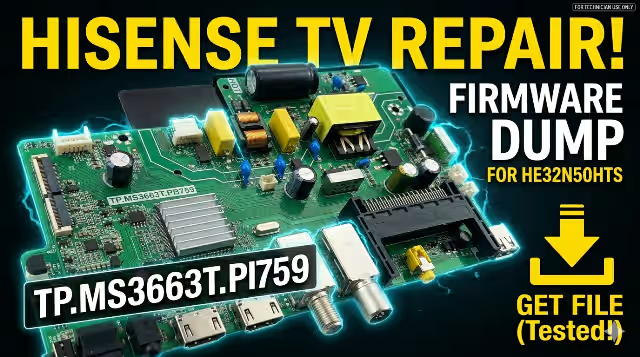
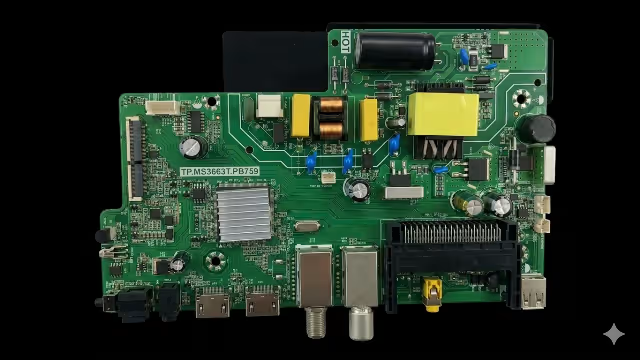
📋 Firmware Overview
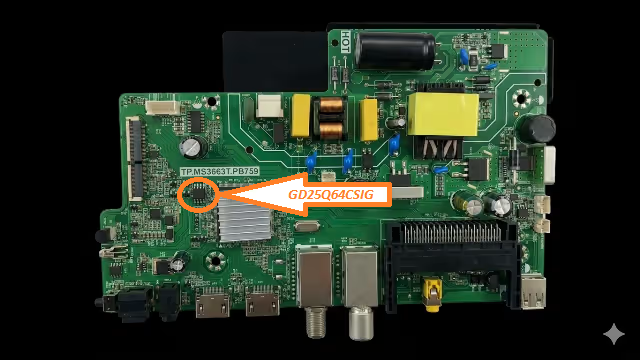
This page provides a free firmware dump download for the TP.MS3663T.PB759 main board used in the HISENSE HE32N50HTS television. The firmware file is a complete SPI flash memory dump extracted from the GD25Q64CSIG chip (position UF1) using the RT809H universal programmer.
This dump has been tested and verified 100% working on the exact board and panel combination listed below. It is intended exclusively for qualified TV repair technicians who need to restore or reprogram a corrupted EEPROM/SPI flash memory.
🔧 Board Specifications
| TV Brand & Model | HISENSE HE32N50HTS |
|---|---|
| Main Board | TP.MS3663T.PB759 |
| LCD Panel | BOEI320WX1-01 |
| SPI Flash Chip | GD25Q64CSIG (8MB) |
| Flash Position | UF1 |
| Programmer | RT809H Universal Programmer |
| File Format | .bin (Binary Dump) |
| File Size | 8 MB (8,388,608 bytes) |
| Status | ✅ Tested 100% Working |
🔍 SPI Flash Chip Location
The SPI flash memory chip GD25Q64CSIG is located at position UF1 on the TP.MS3663T.PB759 main board. This 64-Mbit (8MB) serial flash stores the complete firmware including boot loader, main application, channel data, and user settings.
🚨 Common Issues & Symptoms
The following issues are frequently reported with the HISENSE HE32N50HTS television using the TP.MS3663T.PB759 board and may be resolved by reprogramming the SPI flash memory:
- Dead TV / No Power Response: TV does not turn on, standby LED is off or stuck. Often caused by corrupted boot loader in the SPI flash.
- Stuck on Logo / Boot Loop: TV powers on, shows the HISENSE logo but never reaches the home screen, continuously restarting.
- Backlight On, No Picture: The backlight turns on (screen glows) but no image, no OSD menu. Indicates corrupted main firmware region.
- No Sound / Audio Distortion: Video displays correctly but audio output is missing or distorted across all sources.
- Software Update Failure: TV became bricked after a failed USB or OTA firmware update, resulting in incomplete flash data.
- HDMI / AV Input Not Detected: Input source ports not recognized or showing “No Signal” on all ports despite valid sources connected.
- Frozen Screen / Random Shutdowns: TV freezes during operation or shuts down randomly. Memory corruption causes instability.
- Remote Control Not Responding: IR receiver works but TV firmware does not process commands due to corrupt configuration data.
- Panel Voltage Mismatch Error: Incorrect firmware can send wrong voltage signals to the LCD panel, causing white screen or shutdown protection.
🛠️ Diagnostic & Repair Protocol
Pre-Repair Checklist
Before proceeding with SPI flash reprogramming, perform these diagnostic steps to confirm the root cause is firmware-related:
- Visual Board Inspection: Check the TP.MS3663T.PB759 board for any visible damage — burnt components, swollen capacitors, cracked solder joints, or corroded traces. Clean the board with isopropyl alcohol if needed.
- Power Supply Verification: Measure all output voltages from the power supply board (5V standby, 12V main, backlight voltage). Ensure voltages are within ±5% tolerance before suspecting firmware.
- Backlight Test: Disconnect the LVDS cable and power on. If the backlight driver activates (you can hear a faint high-pitched sound or measure voltage at the LED connector), the power management section is functional.
- SPI Flash Chip Health Check: Using the RT809H programmer with a SOP8 test clip, attempt to read the existing flash content. If the chip ID is not detected or returns all 0xFF / 0x00 data, the chip may be damaged and needs replacement.
- Read & Backup Original Dump: Always create a backup of the existing flash content before writing new data. Read the chip at least twice and compare checksums to verify read reliability.
- Erase & Write New Firmware: Perform a full chip erase, then write the downloaded firmware dump file. After writing, perform a verify operation to ensure data integrity.
- Reassemble & Power Test: Reinstall the chip (if desoldered), reconnect all cables including LVDS and power supply. Power on the TV and verify boot sequence, picture, sound, and all input sources.
- Factory Reset & Channel Scan: After successful boot, perform a factory reset from the service menu to initialize all settings. Run an auto channel scan to populate the channel list.
RT809H Programming Settings
| Programmer | RT809H |
|---|---|
| Chip Model | GD25Q64C (GigaDevice) |
| Package | SOP8 / SOIC8 |
| Read Speed | Standard (recommended) |
| Operation | Erase → Program → Verify |
| Connection | SOP8 Clip or Desolder |
🎬 Video Tutorial
Watch the step-by-step video guide covering the complete firmware dump and programming process for the TP.MS3663T.PB759 main board:
⬇️ Download Firmware Dump
TP.MS3663T.PB759 · HISENSE HE32N50HTS · GD25Q64CSIG · 8MB .bin
Firmware tested and verified — 100% working
📌 2-Step Download: Click the button above. A sponsored page will open in a new tab — then you will be redirected to the direct download link.
File: TP.MS3663T.PB759_HE32N50HTS_BOEI320WX1-01_GD25Q64C.bin · Size: 8 MB


