 For Technicians Only
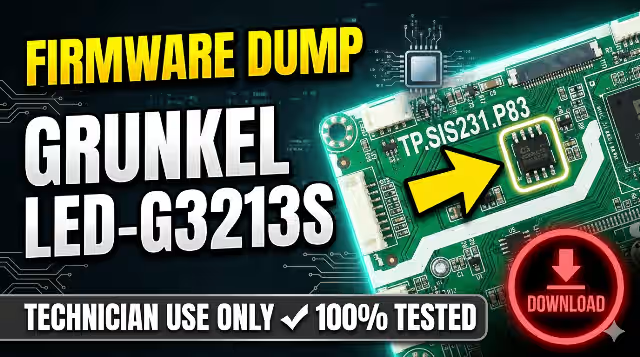
TP.SIS231.P83 Grunkel LED-G3213S Firmware Download – USB Update & Repair
Download the TP.SIS231.P83 Grunkel LED-G3213S firmware from the link below and get access to a simple update repair via USB. This SPI flash dump has been tested and verified 100% working for technician-level board repair and recovery.
✔ Firmware Tested — 100% WorkingMain Board & SPI Specifications
| TV Model | Grunkel LED-G3213S |
|---|---|
| Main Board | TP.SIS231.P83 |
| SPI Flash IC | UF1 — GD25Q64CSIG |
| Flash Size | 64 Mbit (8 MB) |
| Firmware File | SISEU23X8M.bin |
| Update Method | USB Flash Drive (FAT32) |
| Status | ✔ Tested & Working |
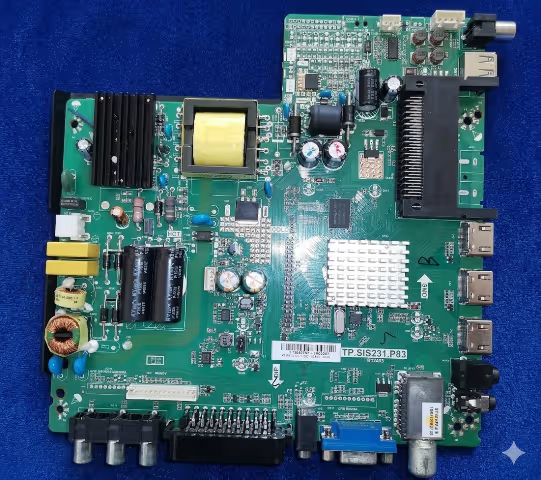
Main Board Reference Image
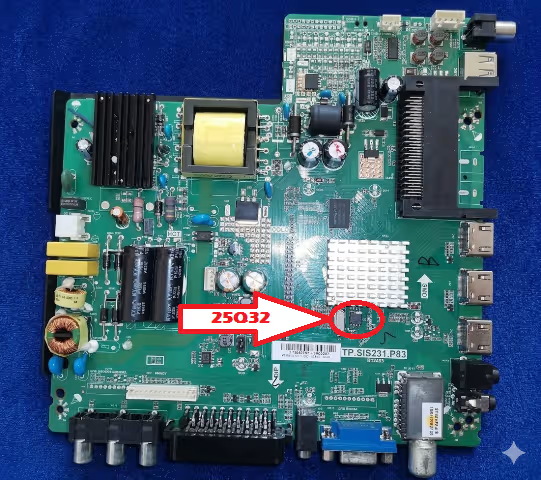
Identify your TP.SIS231.P83 main board using the reference photo below. Verify the board number printed on the PCB before proceeding with any firmware operation.
SPI Flash IC Location
The SPI flash memory IC GD25Q64CSIG is located at position UF1 on the board. Use the image below to locate the chip for reading or programming with an SPI programmer (e.g., CH341A, RT809H).
Firmware Update via USB – Step-by-Step
Follow these steps carefully to update the Grunkel LED-G3213S firmware using a USB flash drive:
- Take a USB flash drive and format it in FAT32 file system.
- Download the firmware archive and extract the “SISEU23X8M.bin” file from it.
- Copy the “SISEU23X8M.bin” file to the root directory of the flash drive. Do not place it inside any folder.
- Unplug the TV from the power outlet. Insert the USB flash drive into the TV’s USB socket, then connect the TV back to the outlet.
- The TV should automatically start flashing from the USB drive. Do not interrupt the process.
- When the red LED starts blinking quickly, the update is complete. Eject the flash drive and restart your TV.
Common Issues – Grunkel LED-G3213S
This firmware resolves the following common problems reported on the TP.SIS231.P83 board:
- TV stuck on logo screen — boot loop, does not reach home screen
- No picture, sound only — backlight works but panel displays black screen
- TV dead — standby LED off, no response to power button or remote
- Standby LED on but TV does not turn on — power button unresponsive
- Firmware corruption after power surge or unstable electricity
- HDMI / AV / USB inputs not detected or not switching
- OSD menu freezing, settings not saving after restart
- Audio distortion, no sound output, or volume control not working
- Remote control unresponsive — IR receiver or software issue
- Channel auto-scan failure — tuner not detecting any channels
Diagnostic & Repair Protocol
Before flashing, perform these diagnostic checks to confirm the issue is firmware-related:
- Visual Inspection: Check for burnt components, swollen capacitors, or damaged traces on the TP.SIS231.P83 board.
- Power Supply Test: Verify all voltage rails (5V, 12V, 3.3V, 1.8V) are within specification using a multimeter.
- SPI Flash Integrity: Read the existing SPI flash content with a CH341A or RT809H programmer. Verify checksum against known good dump.
- Backlight Test: Confirm LED backlight strips are functional. Test with external LED tester if needed.
- LVDS Cable Check: Inspect the LVDS flat cable connection between main board and T-CON. Reseat if loose.
- USB Update First: Always attempt USB firmware update before desoldering the SPI flash chip for direct programming.
- Post-Flash Verification: After successful flash, perform factory reset from the service menu and run channel auto-scan to confirm full functionality.
- EEPROM Reset: If settings are corrupted after flash, clear the EEPROM (24C02/24C04) or replace it with a blank IC.
Video Tutorial
Watch the full firmware update tutorial for the TP.SIS231.P83 Grunkel LED-G3213S below:
Download Firmware
TP.SIS231.P83 — Grunkel LED-G3213S
File: SISEU23X8M.bin | SPI: GD25Q64CSIG
✔ Access unlocked — Click below to download
Get File – Direct DownloadRelated Firmware Downloads
Looking for firmware for similar boards? Check out these related downloads: