
Technician use only
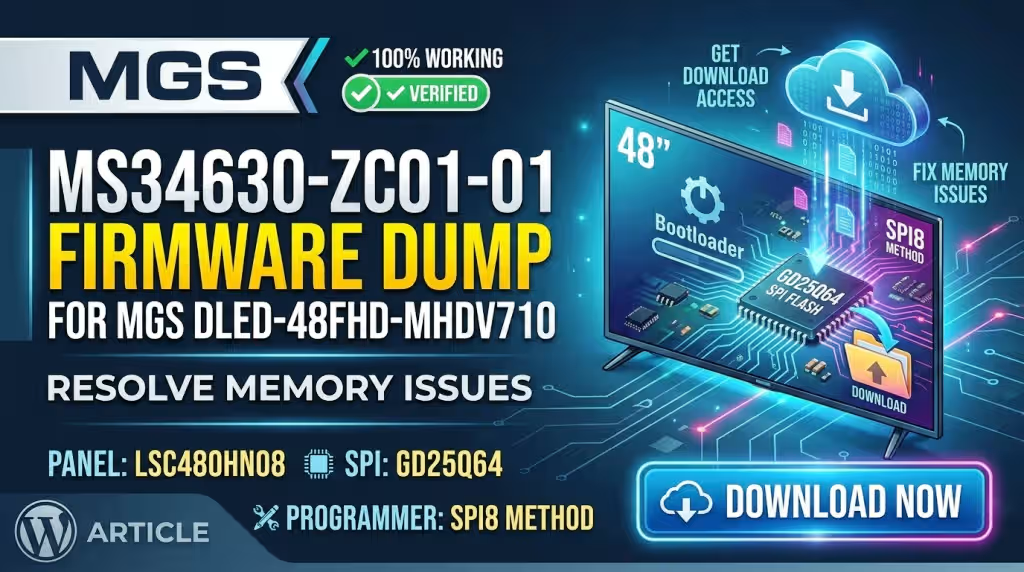
MS34630-ZC01-01 Firmware Dump — MGS DLED-48FHD-MHDV710 SPI Repair
The tested 8 MB GD25Q64 SPI dump that clears memory, boot-loop and panel-init faults on the MGS DLED-48FHD-MHDV710 — with the exact chip location, RT809H write procedure and a full diagnostic protocol.
- BRAND MGS
- MODEL DLED-48FHD-MHDV710
- MAIN MS34630-ZC01-01
- PANEL LSC480HN08
- SPI GD25Q64
- METHOD RT809H
Updated 28 October 2026 Bench tested, 100% working 8 minute read
- Main boardMS34630-ZC01-01
- SPI flashGD25Q64 · 8 MB
- PanelLSC480HN08
- ProgrammerRT809H
- File size8,388,608 bytes
- StatusTested — 100% working
The MS34630-ZC01-01 drives the MGS DLED-48FHD-MHDV710 48 inch full-HD LED television with an LSC480HN08 panel. Nearly every “memory error”, dead standby or stuck-logo complaint on this chassis ends at the GD25Q64 3.3 V SPI flash, which holds the bootloader, panel parameters and NVRAM. Below: the verified dump, the chip position, the exact RT809H settings, and a fault-finding order that stops you from replacing a good main board.
Bench rule: read and save the original chip content before you erase anything. A corrupted dump can still hold the unique panel and ID data, and it is the only roll-back if the donor file does not suit the set.
01 Reference data
Board and firmware specifications
| Brand / model | MGS · DLED-48FHD-MHDV710 |
|---|---|
| Main board | MS34630-ZC01-01 |
| Panel | LSC480HN08 |
| SPI flash | GD25Q64 — 64 Mbit (8 MB), 3.3 V, SOIC-8 208 mil |
| Image size | 8,388,608 bytes |
| Programmer | RT809H (SOP8 socket or SOIC8 clip); RT809F compatible |
| Logic level | 3.3 V on pin 8 — never 5 V |
| Test status | Written back to a blank chip and boot-verified |
| Last updated | 28 October 2026 |
02 Symptom library
Issues reported on this model
These are the faults that actually come in on the MGS DLED-48FHD-MHDV710 with this board. Treat each one as a flash fault until proven otherwise.
- CriticalStuck on the MGS logo
Boot loop or frozen splash: bootloader sectors damaged, usually after an interrupted OTA or a mains surge.
- CriticalOn-screen “memory error”
The classic NVRAM failure — the settings sector fails its checksum and the application never starts.
- CriticalDead after a firmware update
The first sectors were erased mid-write; the set no longer reaches the boot stage at all.
- HighBacklight on, no image, no OSD
Panel init table inside the dump is corrupt, so the SoC never drives the LSC480HN08 panel.
- HighStandby LED blinking, no start
Repeating blink codes with every rail present point to an unreadable or blank SPI chip.
- HighSettings lost at power off
Channel list, language and volume reset every time — the NVRAM area is not writing back.
- MediumRandom freeze, slow menus
Read errors or worn blocks cause watchdog resets during normal operation.
- MediumHDMI reports “No signal”
Corrupted EDID block, even with a proven source and cable.
- MediumUSB update rejected
Bootloader refuses the update file; recovery is only possible with a programmer.
- MediumWhite screen or colour wash
Wrong or damaged panel parameter block, common after a panel or T-CON swap.
Quick triage matrix
| Symptom | Most likely cause | First action |
|---|---|---|
| Logo loop, no audio | Bootloader sector corrupt | Read chip, compare size, rewrite dump |
| “Memory error” on screen | NVRAM checksum fail | Backup, erase, write dump, verify |
| LED blinking only | Blank or unreadable SPI | Check 3.3 V, then read chip in socket |
| Backlight, no picture | Panel table damaged | Rewrite dump, confirm LSC480HN08 in service menu |
| Settings reset each time | Worn flash block | Fit a new GD25Q64, write dump |
| HDMI “No signal” on all ports | EDID block corrupt | Rewrite dump, retest with known source |
| Dead, no standby | Power rail, not flash | Repair supply before touching firmware |
03 Bench procedure
Diagnostic & repair protocol
Work in this order. It takes roughly 25 minutes and rules out the power rails before you ever touch the firmware.
-
Visual inspection and discharge
Discharge the primary capacitor, then check the MS34630-ZC01-01 for burnt feed-throughs, bulged capacitors near the buck converters and corrosion at the LVDS connector.
Why first: a shorted regulator will destroy a freshly written chip within seconds.
-
Confirm standby and core rails
Verify 3.3 V standby, then the 1.8 V, 1.2 V and 1.1 V core rails under load. A missing core rail mimics a blank flash exactly.
-
Capture the UART boot log
Read the 3.3 V serial pads at 115200 baud. A log that stalls at “Boot”, repeats a reset or reports a checksum failure confirms the SPI flash. A silent port with good rails points the same way.
-
Back up the original chip
Clamp the GD25Q64 in-circuit with the RT809H, or desolder it into the SOP8 socket for a clean read. Read it twice and compare before trusting the backup.
-
Write the verified dump
Select GD25Q64, run erase, blank-check, write, then let the verify pass finish before removing the clip.
Why verify: a truncated write still reports success and gives you a dead set.
-
Cold boot and functional test
The logo should appear within 20 seconds. Then check tuner, HDMI 1–3, USB media, audio, standby and wake. Re-enter the service menu and confirm the panel reads LSC480HN08.
04 Hardware location
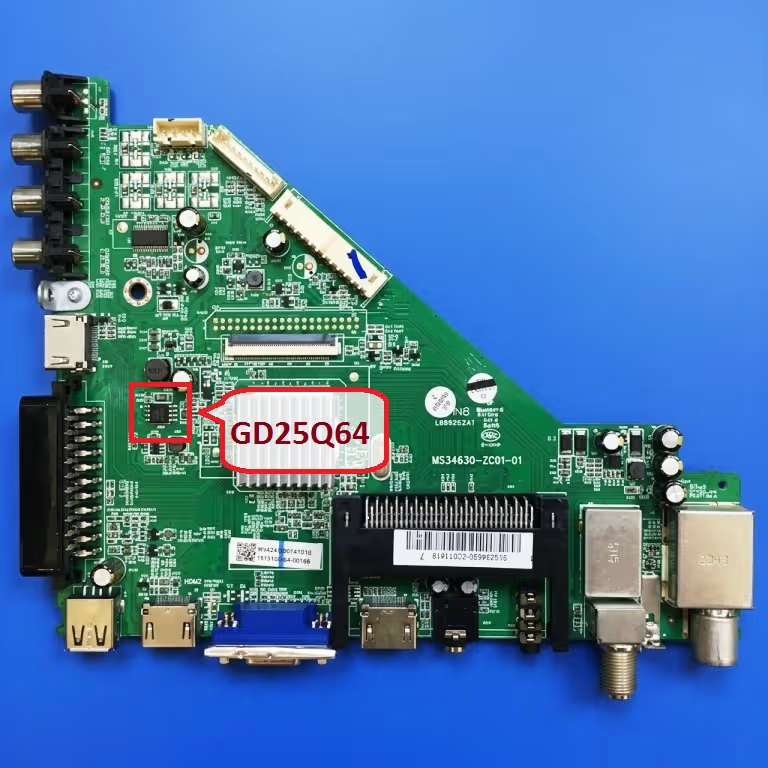
SPI chip identification and pinout
 Tap to zoom
The device is a 64 Mbit part, so exactly 8 MB is addressable. If your programmer reports 1 MB or 2 MB, the chip is not being detected properly — clean the pads and re-seat the clip before writing.
| Pin | Name | Function | RT809H clip |
|---|---|---|---|
| 1 | /CS | Chip select | Pin 1 |
| 2 | DO (IO1) | Data out | Pin 2 |
| 3 | /WP (IO2) | Write protect | Pin 3 |
| 4 | GND | Ground | Pin 4 |
| 5 | DI (IO0) | Data in | Pin 5 |
| 6 | CLK | Clock | Pin 6 |
| 7 | /HOLD (IO3) | Hold / reset | Pin 7 |
| 8 | VCC | 3.3 V supply | Pin 8 |
05 Board reference
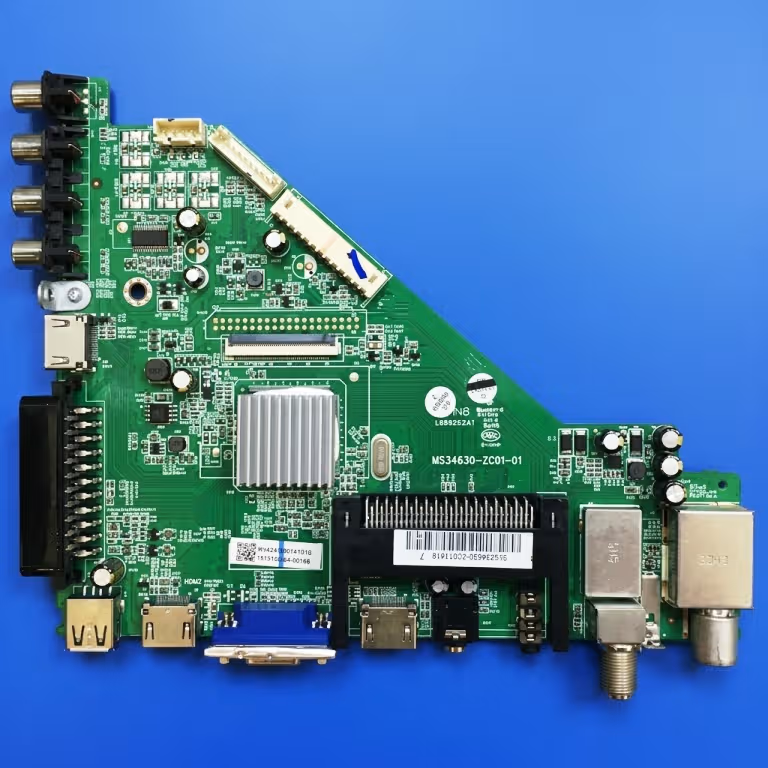
Main board overview
 Tap to zoom
- Power section
Standby and core buck converters; check here before blaming the flash.
- LVDS output
Feeds the LSC480HN08 panel; dirty contacts give no-image faults.
- SPI socket area
GD25Q64 next to the SoC — the only chip you need to write.
06 File payload
Firmware file details
Size 8,388,608 bytes (8 MB / 64 Mbit)
Chip GD25Q64 (GD25Q64CSIG, 3.3 V, SOIC-8)
Board MS34630-ZC01-01
Panel LSC480HN08
Method RT809H — Read / Erase / Blank check / Write / Verify
Confirm size and checksum before you power the set.
07 Programming
Writing the dump with the RT809H
-
Prepare the programmer
Install the current RT809H software, connect the unit and let the self-test pass. Use the SOP8 socket for a desoldered chip, or a quality SOIC8 clip with short leads in-circuit.
-
Select the device manually
SPI Flash → GD25Q64. Do not leave auto-detect on; a mis-detected size truncates the image.
-
Read and save the original
Press Read, confirm 8 MB is returned, and save the file. All FF or repeated read failures mean the chip must come off the board and go into the socket.
-
Erase and blank-check
A chip that will not blank out is write-protected or worn out — fit a new GD25Q64 and start again.
-
Write, verify, refit
Load the dump, write, wait for a full verification match, reflow the chip, clean the area, then apply power.
In-circuit tip: if the clip read is unstable, power the board from its own supply in standby while the programmer feeds pin 8. Never connect two supplies to the same rail at once.
08 Free file
Download the SPI dump
MGS DLED-48FHD-MHDV710 — GD25Q64 dump
One button, two clicks: the first opens the sponsor page in a new tab, the second opens the real firmware file.
Get the free SPI dump- Step 1 — Unlock link
- Step 2 — Download file
09 Answers
Frequently asked questions
Will this dump work on another MGS chassis?
Only with the same MS34630-ZC01-01 revision and an LSC480HN08 panel. A different panel needs its own parameter block, or the set boots to a white screen or wrong colours.
Which chip does the MS34630-ZC01-01 use?
A GD25Q64 — 64 Mbit (8 MB), 3.3 V SPI flash in SOIC-8. A W25Q64 or MX25L6406 can replace it, and the same dump works in them.
Can I use a CH341A instead of the RT809H?
Yes. The file is a plain 8 MB SPI image, so any programmer supporting the GD25Q64 will do. The RT809H is preferred for faster verification and steadier in-circuit clips.
Still showing a memory error after flashing — what next?
Re-check the 3.3 V rail under load and confirm the verify pass was a full match. A good write with the same symptom means DDR or SoC failure, and the main board needs replacement.
Is the dump free and tested?
Yes. It was read from a working MGS DLED-48FHD-MHDV710 on this board, written to a blank GD25Q64, and the television returned to normal operation. It is published for technicians at no cost.
11 Citation
Backlink and citation
If you reference this dump in a forum, blog or repair database, link to the canonical page instead of re-uploading the file. Suggested anchor text: MS34630-ZC01-01 firmware dump.
MS34630-ZC01-01 firmware dump — MGS DLED-48FHD-MHDV710
</a>
Technician notice
Firmware work can permanently damage the main board. Perform these steps only with the right tools, ESD protection and experience. The dump is provided as-is for repair purposes — confirm the board revision and panel on your own unit before writing, and keep a copy of the original chip content.