
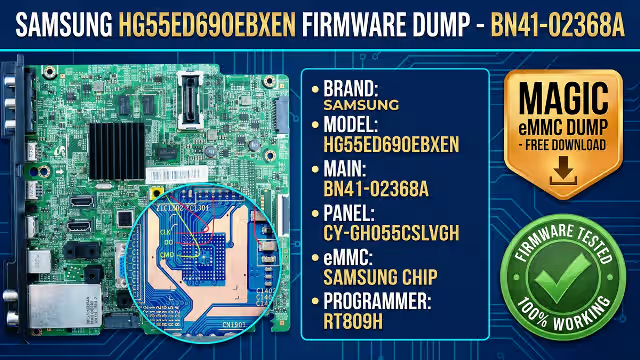
BN41-02368A Firmware Dump for Samsung HG55ED690EBXEN
Access the verified Magic BN41-02368A firmware Samsung eMMC dump, exact RT809H ISP pinout coordinates, and multi-memory (eMMC, SPI, EEPROM, NAND) repair protocol to resolve boot loops, dead standby, and corrupted memory faults.
01. Technical Overview – Samsung HG55ED690EBXEN Memory Recovery
This bench-verified technical release provides the complete Magic eMMC firmware dump for the Samsung HG55ED690EBXEN 55-inch HD690-Series Smart Hospitality LED TV built on the BN41-02368A mainboard (chassis platform HIGH_X14H_EU_HOTEL_D690) paired with the CY-GH055CSLVGH Full HD LVDS display panel.
In commercial hotel and continuous-duty installations, the onboard Samsung eMMC managed NAND IC (IC1301) undergoes heavy daily read/write wear across its journaling partitions (mtd_rwarea, rootfs, and hospitality configuration blocks). Once flash blocks degrade or suffer power-loss corruption, standard USB software updates fail completely because the main processor cannot initialize the bootloader. Reprogramming BOOT1, BOOT2, USER, and EXT_CSD directly via RT809H In-System Programming (ISP) restores full factory operation without costly mainboard replacement.
02. Verified Hardware & Firmware Dump Specifications
Confirm that every board silkscreen code and panel sticker inside your Samsung television matches the specification profile below before writing the binary partitions.
| Parameter | Verified Bench Specification |
|---|---|
| TV Brand | Samsung (Commercial Smart Hospitality Series – HD690) |
| Model Code | HG55ED690EBXEN (Compatible family: HG55ED690EB) |
| Main Board (PCB) | BN41-02368A (Platform: HIGH_X14H_EU_HOTEL_D690) |
| LCD Panel Code | CY-GH055CSLVGH (55″ Full HD 1920×1080 LVDS, T-Con BN41-02110A) |
| Primary eMMC IC | SAMSUNG CHIP at silkscreen IC1301 (BGA-153 Managed eMMC v4.5, 4 GB density — e.g., KLM4G1FEAC-B031 / KLM4G1FE3B) |
| Companion Board ICs | Sub-Micom SPI NOR Flash (W25Q40CL, 3.3V) + SoC NVRAM I2C EEPROM (24C512 at IC905 area) |
| Programmer Method | RT809H Universal Programmer (EMMC_AUTO_ISP 1-bit ISP mode or BGA-153 socket) |
| Dump Partitions Included | Full raw binary set: BOOT1 + BOOT2 + USER (~3.57 GB user area) + EXT_CSD configuration register |
| Firmware Status | Firmware Tested 100% Working (Verified clean boot, OSD, HDMI, Tuner & Hospitality Menu) |
03. BN41-02368A Mainboard Layout & Visual Verification
Inspect your BN41-02368A green SSB chassis against our high-resolution bench reference photograph below. Key identifiers include the black anodized heatsink over the Samsung HIGH_X14H SoC, dual DDR3 RAM modules above the processor, the white top-right LVDS panel header driving the CY-GH055CSLVGH screen, dual stacked hospitality RJ12/RJ45 data ports, the blue 15-pin VGA connector, and the BN40-00294B (DNTS403E3384A) RF tuner shield at the lower-left corner.
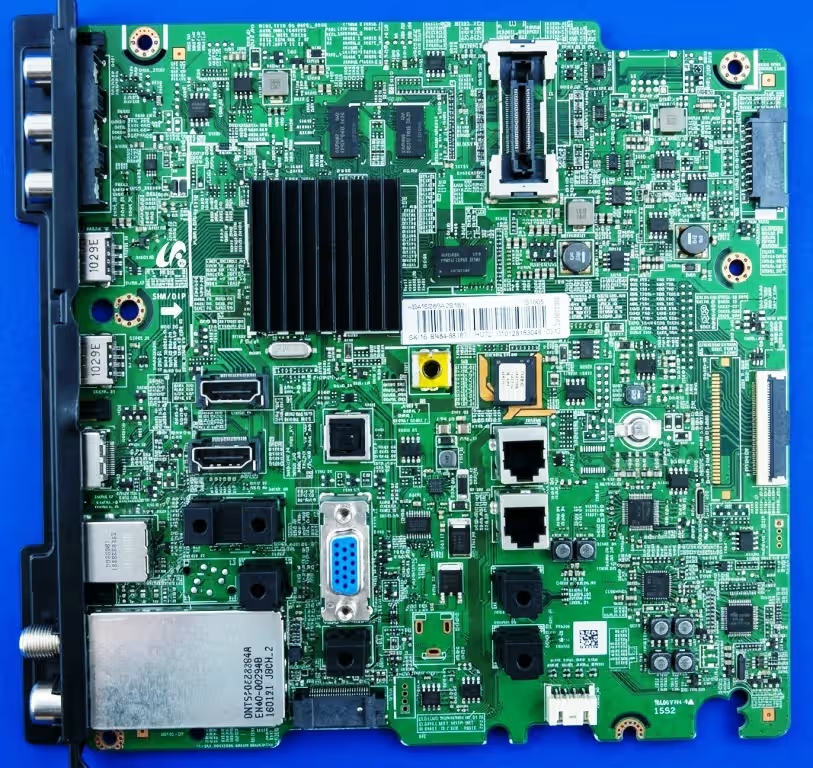 Click to Zoom PCB in New Tab
04. BN41-02368A eMMC ISP Pinout Diagram (RT809H Connection Map)
To read and write the onboard Samsung eMMC chip (IC1301) in-circuit without BGA hot-air removal, solder short (under 10 cm) AWG-30 Kynar jumper wires from your RT809H ISP adapter to the exact passive component pads surrounding IC1301 and ZIC1302 shown in our macro pinout index below. Click the diagram to open the full-resolution zoom view in a new browser tab.
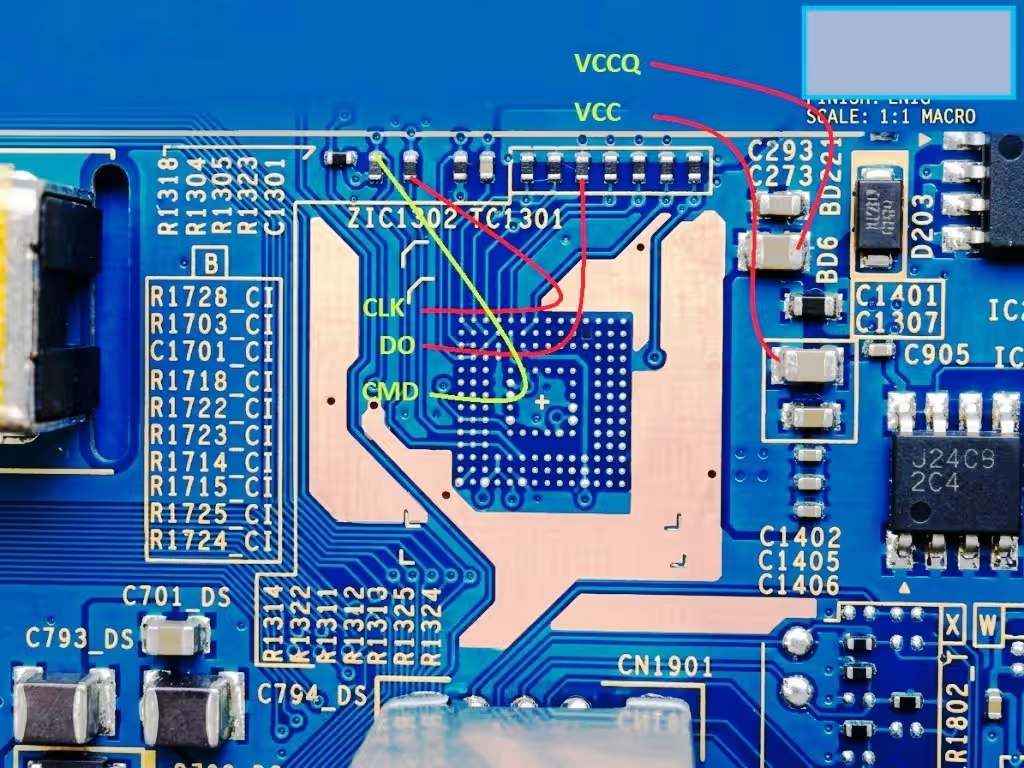 Click to Zoom Pinout in New Tab
| ISP Signal | PCB Silkscreen Coordinate (IC1301 Area) | Electrical Role & Voltage |
|---|---|---|
CMD |
Leftmost series resistor upper pad directly above ZIC1302 (yellow-green trace in diagram) |
Bidirectional command/response initialization line |
CLK |
Second series resistor pad immediately right of CMD above ZIC1302 |
Synchronous MMC clock input from RT809H (keep wire shortest) |
D0 (DAT0) |
4th resistor lower pad from the left inside the 8-resistor array above IC1301 |
1-bit ISP bidirectional data transfer channel |
VCCQ |
Left terminal of upper ceramic decoupling capacitor at C293 / C273 (BD6 rail, upper-right of IC1301) |
eMMC internal controller & I/O logic supply (1.8V nominal) |
VCC |
Left terminal of lower ceramic decoupling capacitor at C1401 / C1307 (below VCCQ cap, right of IC1301) |
Managed NAND flash array core supply (3.3V nominal) |
GND (VSS) |
Exposed copper ground plane surrounding IC1301 or CN1901 connector shield |
Common low-impedance signal & power return reference |
05. Multi-Memory TV Troubleshooting Matrix (eMMC, SPI, EEPROM & NAND)
Accurate board-level diagnostics require isolating which non-volatile memory device holds the fault before erasing any IC. On the Samsung BN41-02368A architecture—and across modern Smart/Hospitality TV mainboards—four distinct memory technologies govern different stages of the boot chain:
| Memory Type | Stored Firmware Payload | Signature Failure Symptom | Bench Recovery Method |
|---|---|---|---|
| eMMC Managed Flash ( IC1301 Samsung BGA-153) |
BOOT1/2 secure loader, Linux/Tizen kernel, Smart Hospitality OS, user partitions & EXT_CSD |
Samsung logo boot loop, standby LED blinks on remote but won’t launch OSD, watchdog reboot every 30–60s | Flash full Magic eMMC dump (BOOT1, BOOT2, USER, EXT_CSD) via RT809H ISP; replace chip if PRE_EOL > 80% |
| SPI NOR Flash ( 25Q40 / 25Q32 SOP-8) |
Standby Sub-Micom code, IR/keypad polling, PS_ON power sequencing & PMIC enable |
Completely dead set, standby red LED off despite valid A5V rail from PSU, zero power-button reaction |
Verify 3.3V on Pin 8; read, erase, write & CRC-verify .BIN dump in SOP-8 adapter on RT809H |
| I2C EEPROM ( 24C512 / 24C256 SOP-8) |
Service Menu NVRAM, panel type ID (CY-GH055CSLVGH), Hotel clone flags, MAC & local offsets |
Frozen logo after wrong Service Menu edit, inverted/solarized LVDS image, locked Hospitality PIN/clone state | Backup original I2C dump first; reprogram clean 24C512 image and align Panel Type in Service Menu |
| Raw SLC NAND (TSOP-48 / BGA on legacy chasses) |
Unassisted raw block filesystem requiring SoC hardware BCH/Hamming ECC management | Progressive boot hang, missing apps, or UART console flooded with uncorrectable ECC bit-flip errors | Program off-board in RT809H TSOP-48 socket with bad-block skip/remap enabled and fresh IC if bad blocks exceed threshold |
06. Confirmed Fault Symptoms – Samsung HG55ED690EBXEN (BN41-02368A)
When the Samsung eMMC chip on a BN41-02368A mainboard develops corrupted filesystem blocks, damaged boot configuration registers, or NAND cell retention loss, the television exhibits one or more of the following verified bench symptoms:
1. Continuous Samsung Logo Boot Loop
The display illuminates, shows the Samsung Smart/Hospitality splash logo for 5 to 12 seconds, clicks off, and restarts endlessly due to unreadable rootfs or mtd_rwarea sectors in IC1301.
2. Standby LED Blinks, No Ignition
The front red LED responds to remote commands and blinks 2x or 5x, PS_ON asserts, yet the processor stalls silently because BOOT1 or EXT_CSD Register 179 (PARTITION_CONFIG) is corrupted.
3. Backlight Active, Blank Dark Screen
LED backlights glow and 12V reaches the BN41-02110A T-Con board, but LVDS video clock transmission to the CY-GH055CSLVGH panel never initializes during early kernel boot.
4. Watchdog Freeze & 45-Second Shutdown
The TV boots to an HDMI source briefly with sluggish or frozen OSD menus, then abruptly resets every 30–60 seconds when the hardware watchdog trips on stalled eMMC write operations.
5. Hospitality Menu / USB Clone Brick
Interrupted hotel USB cloning or LYNK REACH / SINC updates leave the partition table half-written, locking technicians out of the Mute-1-1-9-Enter Hospitality Service Menu.
6. Inverted Picture or Color Solarization
Incorrect LVDS bit-mapping (JEIDA vs VESA) or upside-down geometry after installing a donor BN41-02368A board originally configured for a 40″ or 48″ panel instead of CY-GH055CSLVGH.
07. Systematic Diagnostic & Repair Protocol (RT809H Method)
Follow this structured 8-step bench protocol to diagnose hardware integrity, safeguard original calibration keys, and program the verified BN41-02368A Magic eMMC dump cleanly.
-
1
DC Rail & LDO Ripple Verification
Disconnect the LVDS ribbon and inspect the
BN41-02368Aboard under magnification. Confirm stable PSU standby (A5V) and main (B13V) rails, then measure clean 3.3V at capacitorC1401/C1307(VCC) and 1.8V at capacitorC293/C273(VCCQ) with under 30 mVpp ripple. Shorted ceramic caps onVCCQcan mimic a dead eMMC. -
2
UART Log & Companion SPI / EEPROM Pre-Check
If standby LED is completely dead, verify the 3.3V sub-micom
W25Q40CLSPI flash first. If standby responds or UART console halts ateMMC init fail/mmc0: error -110/ read-only mount errors, proceed directly to eMMC ISP recovery. Always read and save a backup of the 8-pin24C512I2C EEPROM (IC905area) before touching the eMMC. -
3
Precision ISP Soldering & SoC Bus Isolation
Using 0.25 mm (AWG-30) insulated wire kept shorter than 8–10 cm, solder
CMD,CLK,D0,VCCQ,VCC, andGNDexactly as mapped in Section 04. If powering from the TV’s own standby PSU rather than RT809H LDOs, omit the externalVCC/VCCQwires and bridge the main SoC crystal oscillator pins to prevent the Samsung CPU from contesting the eMMC bus. -
4
RT809H Initialization & Samsung eMMC Health Audit
Launch the latest RT809H software, choose
EMMC_AUTO_ISP, and set I/O voltage to1.8V. Click Read ID and inspect the console log forEXT_CSDlife estimation (PRE_EOL_INFOand Device Life Time Type A/B). If health reports0x01 Normal (0–10% wear), the original Samsung IC can be reprogrammed; if it reports0x03 Urgent (>80% wear)or permanent write-protect lock, replaceIC1301with a new SamsungKLM4G1FEAC-B031/KLM8G1GETF-B041BGA-153 chip. -
5
Mandatory Original Partition Backup
Execute a full Read of the existing
BOOT1,BOOT2,USER, andEXT_CSDfiles into a labeled customer backup folder. Even when the OS partition is corrupted, the original dump retains unit-specific MAC address, serial number, and HDCP / Widevine hospitality DRM keys. -
6
Write & CRC-Verify the Magic eMMC Dump
Extract our downloaded
BN41-02368Aarchive using the latest WinRAR or 7-Zip. PlaceBOOT1,BOOT2,USER, andEXT_CSDin a single directory, load them into RT809H, confirmEXT_CSDboot configuration is active (0x48/ Boot1 enabled), and execute Write with automatic verification. Wait until the RT809H log confirms 100% checksum match with zero write errors. -
7
Micro-Solder Cleanup & Damping Resistor Check
Desolder all ISP leads gently at 310°C and remove any crystal jumper. Under a stereo microscope, measure continuity across every tiny 0201/0402 series resistor above
ZIC1302andIC1301(typically 0 Ω to 22 Ω)—a tombstoned or crackedCLK/CMDresistor during wire removal will prevent the board from booting. Clean all flux residue with 99.9% isopropyl alcohol. -
8
Panel Calibration (CY-GH055CSLVGH) & Burn-In Validation
Reconnect the LVDS cable, speakers, and IR board, then apply AC power. Once the display boots, enter the Samsung Hospitality / Service Menu (
Mute + 1 + 1 + 9 + EnterorInfo + Menu + Mute + Powerfrom standby) to verify Panel Type matches CY-GH055CSLVGH, perform a Factory Reset, verify HDMI HDCP handshake, RF tuner lock, and RJ12/LAN ports, and complete a 2-hour thermal soak with 5 cold AC power cycles.
Download Magic eMMC Firmware Dump – BN41-02368A
Samsung HG55ED690EBXEN • Panel CY-GH055CSLVGH • Samsung eMMC IC1301 • RT809H Tested 100%
Step 1 of 2: First click opens our sponsor partner in a new tab and unlocks the direct eMMC dump link on this same button.
09. Technician Frequently Asked Questions (BN41-02368A)
Can I flash this BN41-02368A eMMC dump via standard USB stick?
BOOT1, BOOT2, USER, and EXT_CSD) extracted directly from IC1301 for boards with dead bootloaders or corrupted partitions. You must write it using an RT809H (or equivalent eMMC ISP/BGA programmer) via the ISP pinout or a BGA-153 socket.
Will this HG55ED690EBXEN dump work on 40-inch or 48-inch BN41-02368A boards?
HIGH_X14H_EU_HOTEL_D690 eMMC operating system boots across the ED690 hospitality chassis family, but this image is factory-aligned for the 55-inch CY-GH055CSLVGH panel. If used on an HG40ED690 or HG48ED690 panel, you must adjust the Panel Type option inside the Samsung Service Menu and retain your original 24C512 EEPROM backup.
Why does RT809H fail to detect IC1301 in EMMC_AUTO_ISP mode?
CLK signal ringing, (2) main Samsung SoC attempting to boot simultaneously and holding CMD/D0—bridge the main crystal oscillator when using TV standby power, or (3) incorrect VCCQ voltage setting (set VCCQ = 1.8V and verify no short on C293/C273).
Should I reuse the old Samsung eMMC chip or solder a new BGA-153 IC?
EXT_CSD wear-leveling reports above 50–80% life used or read-only block errors, reball and install a fresh Samsung BGA-153 eMMC chip before flashing this tested dump to guarantee a permanent repair.
10. Related Verified Firmware Dumps & Technician Reference Links
Explore additional bench-tested Samsung eMMC, SPI NOR, and EEPROM dumps in our TV Tech Online hardware repository, or reference official Samsung Hospitality specifications (Samsung HG55ED690EBXEN Support Specs):
- Samsung eMMC Firmware Dumps Archive
- BN41-02534B Samsung UE32K5500BU eMMC Dump
- BN41-01958B Samsung UE32F6200AK eMMC & ISP Pinout
- All Verified RT809H eMMC ISP Dumps
- Samsung & Universal EEPROM Repair Dumps
- SPI NOR Flash 25Q32 / 25Q64 TV Dumps