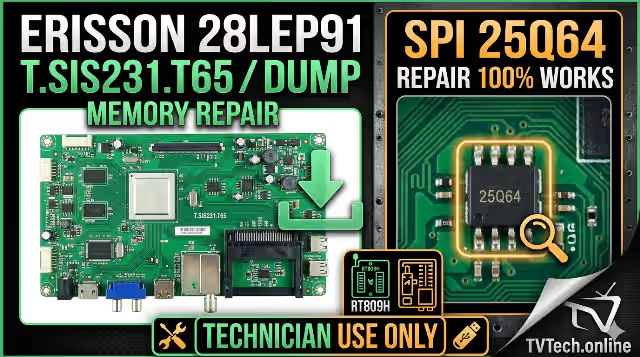
T.SIS231.T65 Firmware Dump – Erisson 28LEP91 SPI Flash Download
Magic SPI binary for 25Q64 memory IC repair • RT809H & USB update supported • 100% tested
Table of Contents
Overview
The T.SIS231.T65 is a universal LED TV main board widely used in budget television sets, including the Erisson 28LEP91. This board relies on a 25Q64 SPI flash memory IC to store the entire firmware — including the bootloader, channel data, panel timing parameters, and system configurations.
When the SPI memory becomes corrupted — whether through power surges, failed software updates, or component degradation — the TV can exhibit a range of critical failures. This page provides a 100% tested firmware dump extracted directly from a known-good working unit, ready to flash onto a replacement or existing 25Q64 chip using an RT809H universal programmer or via USB update method.
Board & Firmware Specifications
| Brand | Erisson |
|---|---|
| Model | 28LEP91 |
| Main Board | T.SIS231.T65 |
| LCD Panel | ST2751A01.1 |
| SPI Flash IC | 25Q64 (64Mbit / 8MB) |
| Programmer | RT809H / USB Update |
| File Type | Full SPI Dump (.bin) |
| Firmware Status | ✔ 100% Tested & Working |
Main Board Reference
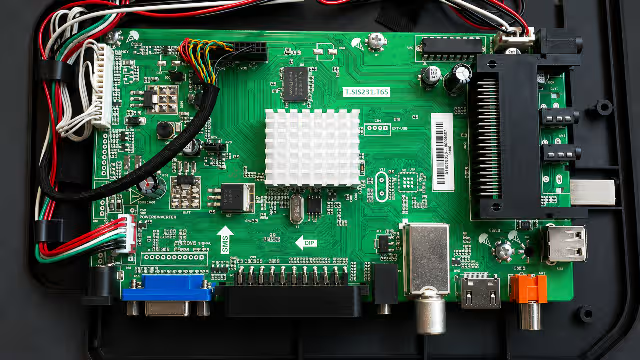
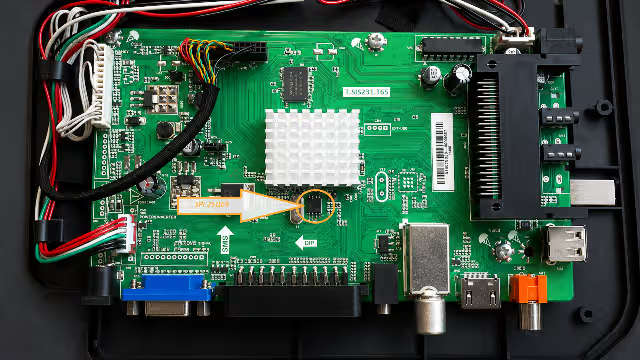
T.SIS231.T65 main board – Erisson 28LEP91. Locate the 25Q64 SPI IC near the main processor.
25Q64 SPI Flash IC – the target chip for firmware dump flashing.
Common Issues & Symptoms
The following symptoms on the Erisson 28LEP91 with T.SIS231.T65 board indicate potential SPI memory corruption requiring a firmware re-flash:
- Stuck on Logo / Boot Loop — TV powers on, displays the Erisson logo, then restarts continuously without reaching the home screen.
- Dead Set (Standby LED On) — The standby indicator lights up but the TV does not respond to remote or panel buttons. No display, no sound.
- Backlight On, Black Screen — The backlight illuminates (visible glow) but no image or OSD appears. Panel timing data may be corrupted.
- No Audio, No Video (NAND) — Complete absence of audio and video output despite correct power supply voltages on all rails.
- Frozen on Source / Input Menu — The OSD menu appears but the system is frozen and unresponsive to any input.
- Automatic Shut-Off After 2–3 Seconds — TV attempts to boot, briefly activates the backlight, then shuts down as a protection response.
- Corrupted OSD / Garbled Display — On-screen text and menus appear distorted, with misplaced characters or color artifacts.
- Post-Update Failure — TV became inoperable after a USB software update was interrupted or failed midway.
Diagnostic & Repair Protocol
Step 1 — Visual Inspection & Voltage Verification
Before assuming a firmware fault, perform a thorough visual inspection of the T.SIS231.T65 board for blown capacitors, burnt resistors, or cracked solder joints. Verify the following voltage rails with a multimeter:
- 5V Standby — Must be present at the power connector.
- 3.3V Logic — Required for SPI flash IC and processor operation.
- 1.2V / 1.8V Core — Processor core voltages must be stable.
- 12V / 24V Backlight — Check if the backlight driver receives proper input.
Step 2 — SPI Flash Extraction (RT809H Method)
- Power off and unplug the TV completely. Discharge any residual capacitance.
- Locate the 25Q64 SPI flash IC on the T.SIS231.T65 board (refer to the board image above).
- Connect the RT809H programmer to the SPI IC using a SOIC8 test clip or desolder the chip for direct socket programming.
- Open the RT809H software, detect the chip (should read as W25Q64 / GD25Q64 / MX25L6406E or equivalent 64Mbit device).
- Read and save a backup of the current (corrupted) firmware before proceeding.
- Load the downloaded T.SIS231.T65 firmware dump file into the programmer software.
- Execute Erase → Program → Verify sequence. Ensure verification passes with zero errors.
- Resolder the IC (if removed) or disconnect the test clip. Reassemble and test the TV.
Step 3 — USB Update Method (Alternative)
- Format a USB flash drive as FAT32 (max 8GB recommended).
- Copy the firmware file to the root directory of the USB drive.
- Insert the USB drive into the TV’s USB port.
- Power on the TV — if the bootloader is intact, the update process should start automatically.
- Wait for the process to complete (do not power off). The TV will restart automatically.
Step 4 — Post-Flash Verification
- Confirm the TV boots past the logo and reaches the initial setup or home screen.
- Run an auto-tuning / channel scan to verify the tuner functionality.
- Test all HDMI, AV, USB, and antenna inputs for proper signal processing.
- Check audio output (internal speakers and headphone jack if applicable).
- Verify the OSD menu is fully responsive and all settings are accessible.
- Perform a factory reset from the service menu if any residual configuration issues persist.
Video Guide
Download Firmware Dump
File: T.SIS231.T65 – Erisson 28LEP91 – 25Q64 Full SPI Dump
Size: 8 MB (.bin) | Status: Verified ✔
Click Step 1 first. After the page opens, return here and click Step 2 to get the firmware file.
Frequently Asked Questions
What issues does the T.SIS231.T65 firmware dump fix on Erisson 28LEP91?
This dump resolves stuck logo, boot loops, no display output, backlight on but black screen, EEPROM corruption, dead mainboard after power surge, and audio with no video issues.
Which programmer is needed for the T.SIS231.T65 SPI flash?
Use the RT809H universal programmer with a SOIC8 clip or socket adapter. Alternatively, the USB update method works if the bootloader is still functional.
Is this T.SIS231.T65 firmware dump tested?
Yes. This firmware dump is 100% tested and verified working on the Erisson 28LEP91 with the ST2751A01.1 LCD panel. It was extracted from a fully operational unit.
Can I use this dump with a different LCD panel?
This dump contains timing parameters for the ST2751A01.1 panel. If your TV uses a different panel, you may need to adjust the panel settings via the factory service menu after flashing, or source a dump specific to your panel.