


TP.VST59.P8B Firmware Dump for DIGITAL DLE-3215 TV
⚠️ FOR TECHNICIAN USE ONLY: Proceed with caution. Incorrect flashing may damage your device.
Bring your TV back to life with the power of a proven firmware solution! This post provides the verified TP.VST59.P8B firmware dump specifically designed for the DIGITAL DLE-3215 model. If your TV is stuck on the logo, has no display, or is restarting continuously, this dump will resolve the software corruption issues.
Technical Specifications
| Brand | DIGITAL |
| Model | DLE-3215 |
| Main Board | TP.VST59.P8B |
| LCD Panel | LS315TU5P00 |
| SPI Flash | W25Q32 |
| Programmer Method | RT809H |
| Firmware Status | 100% Working (Tested) |
Hardware Visuals
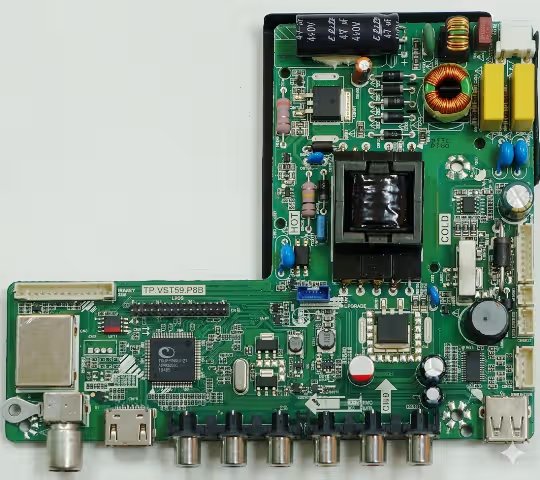
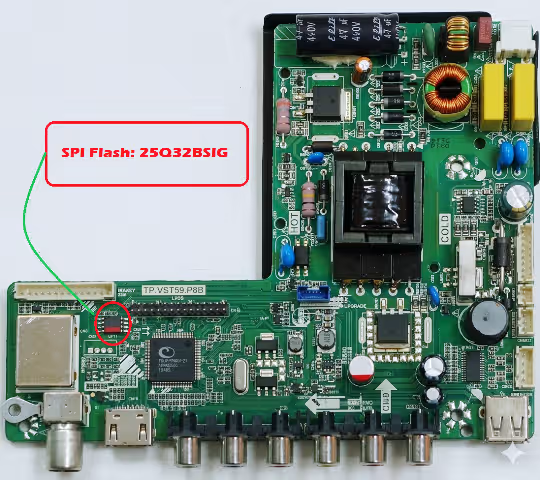
Diagnostic & Repair Protocol
Before flashing the firmware, ensure you have diagnosed the hardware correctly. Common symptoms for this board include:
- Dead Set: TV does not power on, LED indicator off.
- Boot Loop: TV turns on and off repeatedly.
- Logo Stuck: TV freezes on the manufacturer logo screen.
Repair Steps:
- Open the back cover of the TV.
- Locate the Main Board (TP.VST59.P8B).
- Identify the SPI Flash IC (W25Q32).
- Connect your RT809H programmer clip to the IC pins.
- Erase the existing corrupted data.
- Write the new firmware dump provided below.
- Reassemble and test the TV.
Firmware Download
Click the button below to generate your secure download link.


