

17MB95M Firmware Dump for FINLUX 39FLHZR168S — Free Download
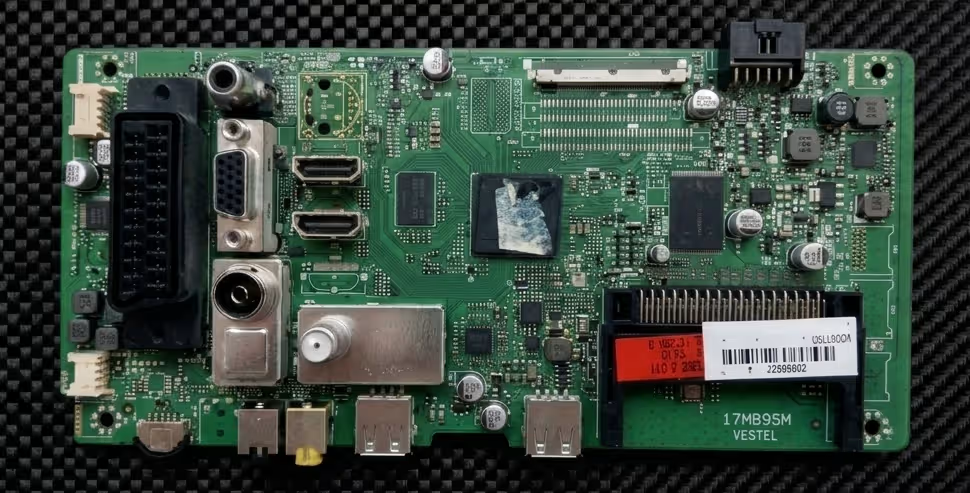
This page provides a tested and verified firmware dump for the Vestel 17MB95M main board used in the FINLUX 39FLHZR168S television. The memory IC (MACRONIX 25L1606E — 2 Megabyte SPI Flash) has been read, verified, and confirmed 100% working on the target unit. This resource is intended exclusively for qualified TV repair technicians performing board-level memory recovery and firmware restoration.
Hardware Specification Table
| Brand | Vestel |
|---|---|
| TV Model | FINLUX 39FLHZR168S |
| Main Board | 17MB95M |
| Power Board | 17IPS20 |
| MCU Location | Under Heatsink |
| Panel | 39″ VES390UNDA-01 |
| Flash IC (U10) | MACRONIX 25L1606E — 2 MB SPI Flash |
| Firmware Status | ✔ Tested 100% Working |
Common Issues for FINLUX 39FLHZR168S (17MB95M)
The following symptoms typically indicate corrupted firmware or a faulty SPI flash IC on the 17MB95M main board. If your FINLUX 39FLHZR168S exhibits any of these problems, a firmware re-flash is the recommended first diagnostic step before replacing components.
- Dead TV — No standby LED: Unit does not power on at all; no red standby indicator. After verifying the 17IPS20 power supply outputs are correct, the fault often traces to a corrupted boot sector on the MACRONIX 25L1606E SPI flash.
- Stuck on boot logo / boot loop: The Finlux logo appears on screen but the TV never reaches the home menu, or it reboots endlessly. This is a classic sign of incomplete firmware update or power interruption during a previous software upgrade.
- Backlight ON but no image (black screen): The 17IPS20 supplies power, the backlight is active, but the panel shows no picture and no OSD. The panel T-CON data may not be initialised due to missing or corrupt panel configuration in the firmware.
- No signal on all inputs — HDMI / AV / USB unresponsive: All input ports fail to detect sources. This typically indicates the main processor is partially running but the I/O initialisation data in flash is damaged.
- Audio present but no video output: Sound plays normally through the speakers, but the VES390UNDA-01 panel remains dark. The LVDS output configuration stored in the SPI flash may be corrupt.
- OSD menu freezes or shows garbled graphics: On-screen display elements render incorrectly or the TV freezes when entering the menu system. Corrupted GUI assets in the firmware image are the usual cause.
- Channel scan fails or does not save channels: The tuner initialises but cannot complete a scan, or channels are lost after every power cycle. EEPROM data within the flash dump may need to be restored to factory defaults.
- Software update via USB fails: The TV does not detect the USB drive or the update process halts with an error. In these cases, an external SPI programmer is required to flash the IC directly.
- Random shutdowns / auto-restart: The TV powers off unexpectedly after a few minutes of operation. Watchdog timer resets caused by firmware faults can produce this behavior.
- SmartTV / network functions not loading: Connected features fail to launch or crash immediately. Application data corruption in the firmware image is the common root cause.
Diagnostic & Repair Protocol
Follow this structured procedure to safely restore the 17MB95M firmware on your FINLUX 39FLHZR168S unit. Proper technique prevents damage to the SPI flash IC and ensures a successful first-time repair.
Step-by-Step Repair Instructions
- Safety first: Disconnect the TV from mains power. Discharge residual capacitor voltage on the 17IPS20 power board by pressing the power button for 10 seconds with the unit unplugged.
- Access the main board: Remove the rear panel screws and carefully detach all ribbon cables, LVDS connectors, and wire harnesses from the 17MB95M board. Photograph the connections before removal for reassembly reference.
- Locate the SPI flash IC (U10): Identify the MACRONIX 25L1606E chip at position U10 on the 17MB95M PCB. It is an 8-pin SOP package located near the main processor area.
- Connect the SPI programmer: Use a compatible programmer (CH341A, RT809F, RT809H, or TL866II Plus) with a SOP8 test clip or adapter. Connect directly to the IC — in-circuit programming is acceptable if you disconnect the board from all power sources and remove the LVDS cable.
- Backup the original dump: Before writing any new data, always read and save the existing flash contents as a backup file. This allows you to revert if needed.
- Verify the IC is detected: Confirm your programmer software recognises the MACRONIX MX25L1606E (2 MB / 16 Mbit). Select the correct chip model from the database to ensure proper read/write parameters.
- Erase the chip: Perform a full chip erase before writing. Verify the erase completed successfully (all bytes read as 0xFF).
- Write the firmware dump: Load the downloaded firmware file and write it to the MACRONIX 25L1606E. Use the “Write” function — do not use “Auto Program” unless you understand the sequence your programmer executes.
- Verify the write: After writing, perform a Verify operation to compare the chip contents against the source file byte-for-byte. A successful verify confirms the flash is correctly programmed.
- Reassemble and test: Reconnect the LVDS cable, all ribbon cables, and wire harnesses to the 17MB95M board. Reconnect the 17IPS20 power board. Power on the TV — it should boot to the Finlux setup wizard on first run.
- Post-flash configuration: Complete the initial setup (language, country, channel scan). If the panel displays an incorrect resolution or image artifacts, verify the LVDS cable is properly seated and the panel model matches (VES390UNDA-01).
Video Tutorial — 17MB95M Firmware Flashing Guide
Download 17MB95M Firmware Dump
FINLUX 39FLHZR168S — 17MB95M Dump File
Flash IC: MACRONIX 25L1606E · 2 MB SPI · Verified & Working
⬇ Download Firmware Dump
STEP 1 Click the button — a sponsor tab opens.
STEP 2 Click the button again — your download starts.


