

⬡ Firmware Dump Repository — Technician Use Only
⚙ For Technician Use Only
DS-80293_PREV1.1 Firmware Dump
⬡ Step 2 — Download Firmware Dump
DS-80293_PREV1.1 Firmware Dump
HiLook DVR-204U-F1 — Free Download
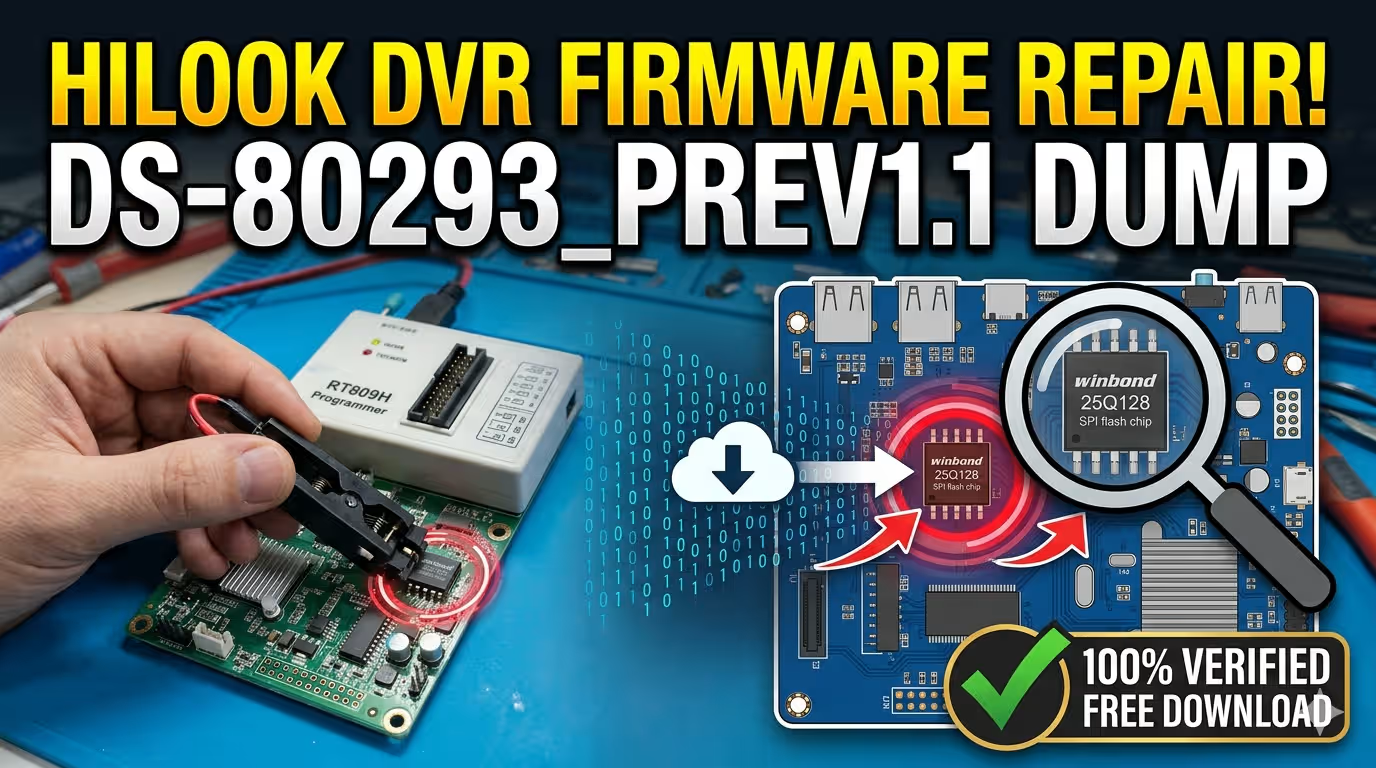
Verified 100% working SPI memory DS-80293_PREV1.1 firmware dump for HiLook DVR-204U-F1. Repair boot failure, fix lost password, and restore corrupted firmware using RT809H programmer and 25Q128 SPI flash IC.
Published: · Category: DVR Camera Security Firmware
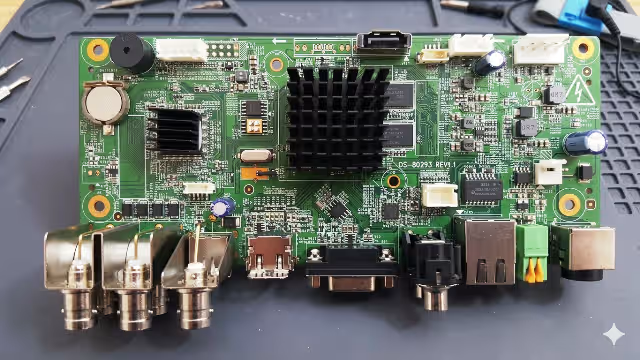
▲ DS-80293 REV1.1 — Main Board Overview (HiLook DVR-204U-F1)
Firmware Specifications
| Parameter | Details |
|---|---|
| Board Model | DS-80293_PREV1.1 |
| Device | HiLook DVR-204U-F1 |
| Device Type | 4-Channel DVR Security Recorder |
| SPI Flash IC | 25Q128 (128 Mbit / 16 MB) |
| Programmer | RT809H Universal Programmer |
| Dump Type | Full SPI Memory Dump (Binary) |
| File Status | ✅ Verified — 100% Working |
| Dump Date | May 30, 2026 |
| Price | Free Download |
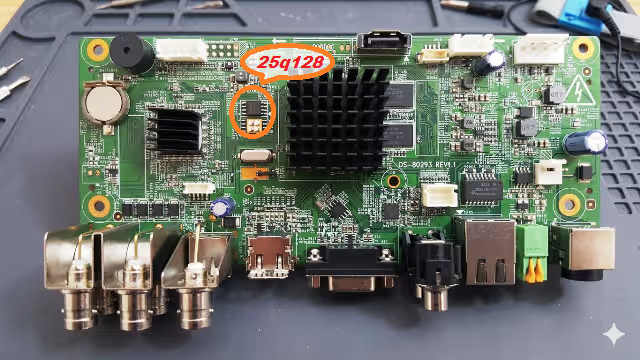
▲ SPI 25Q128 IC Location on DS-80293 REV1.1 Board
Common Issues This Firmware Resolves
- Lost Password / Locked Out: Administrator password forgotten — device completely inaccessible via local UI or network.
- Boot Loop / Stuck on Logo: DVR continuously restarts or freezes on the HiLook splash screen, never reaching the main interface.
- No Video Output: Black screen on HDMI/VGA with no OSD display — caused by corrupted display initialization data in SPI memory.
- Firmware Upgrade Failure: Interrupted or failed firmware update leaving the device in a bricked or semi-functional state.
- Network Configuration Corruption: Device unreachable on network, IP settings reset fail, or DHCP not responding after memory corruption.
- HDD Not Detected: Hard drive not recognized despite being functional — caused by corrupted storage controller initialization in firmware.
- Date/Time Reset Loop: System clock resets on every reboot indicating RTC initialization data corruption in SPI flash.
- Channel Configuration Lost: Camera inputs not detected or channel settings wiped after abnormal power events.
- Menu System Corruption: OSD menu partially loads, shows garbled text, or certain settings pages crash the interface.
- Remote Access Failure: Hik-Connect / DDNS / P2P cloud connectivity broken despite correct network configuration.
Diagnostic & Repair Protocol
Follow this step-by-step procedure for safe firmware restoration:
- Power Off & Disassemble: Disconnect all power sources. Remove the DVR cover and locate the DS-80293 REV1.1 main board.
- Locate SPI Flash IC: Identify the 25Q128 SPI flash chip on the board (refer to the SPI location image above).
- Desolder or Use Clip: Either desolder the 25Q128 IC using a hot air rework station or attach an SOP8 test clip directly on the chip (in-circuit reading may be unreliable).
- Connect to RT809H Programmer: Insert the SPI IC into the RT809H socket adapter or connect via the test clip. Launch the RT809H software and select the chip model W25Q128.
- Backup Original Dump: Before writing, always read and save the current (corrupted) dump as a backup file for reference.
- Write Firmware Dump: Load the downloaded DS-80293_PREV1.1 firmware dump file. Execute Erase → Program → Verify sequence to ensure a clean write with no errors.
- Resolder & Reassemble: Carefully resolder the SPI IC back to the board (if desoldered). Reassemble the DVR enclosure.
- Power On & Test: Connect power, HDMI/VGA monitor, and verify the device boots to the main login screen. Default credentials will be restored.
- Backup New SPI Dump: After confirming the repair is successful, create a fresh backup dump of the working SPI for future use.
- Reconfigure Device: Set new admin password, network settings, recording schedules, and camera channels as needed.
⚠ Important: This firmware dump is intended for qualified electronics technicians only. Incorrect SPI programming can permanently damage the device. Always backup the original SPI content before writing. Use proper ESD protection when handling the main board.
✔ Verified: This firmware dump file has been tested and confirmed 100% working on the HiLook DVR-204U-F1 with DS-80293_PREV1.1 board revision. Backup your SPI dump immediately after successful repair.
Video Guide — SPI Firmware Repair
Download Firmware Dump
DS-80293_PREV1.1_HiLook_DVR-204U-F1_25Q128.bin
SPI Full Dump — 16 MB — Verified Working ✅
Two-step download: Click Step 1 first, then click Step 2 to get the file.
⬡ Step 2 — Download Firmware Dump


