
 For Technicians Only
17MB82S Firmware Dump – KUNFT 32VDLM15 SPI Memory Repair
Tested Dump File – Instant DownloadIf your KUNFT 32VDLM15 television is stuck on the boot logo, has a dead screen with standby LED blinking, or fails to start entirely, the problem very likely originates from corrupted SPI flash memory on the 17MB82S mainboard. This page provides the verified firmware dump files you need to restore full operation by reprogramming the SPI memory chips.
Hardware Specifications
| Parameter | Detail |
|---|---|
| Brand | KUNFT |
| Model | 32VDLM15 |
| Main Board | 17MB82S |
| Panel | VES315WNDL-2D-N02 |
| SPI Chip U12 | 25Q64FV (64Mbit / 8MB) |
| SPI Chip U10 | 25Q16BV (16Mbit / 2MB) |
| Programmer | SP8 Universal Programmer |
| Firmware Status | Tested 100% Working |
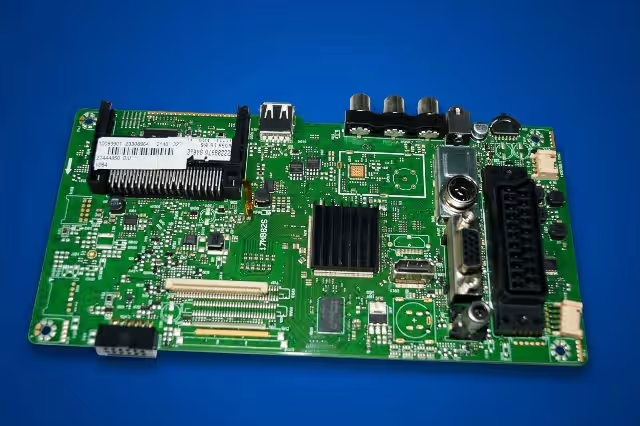
Mainboard Overview
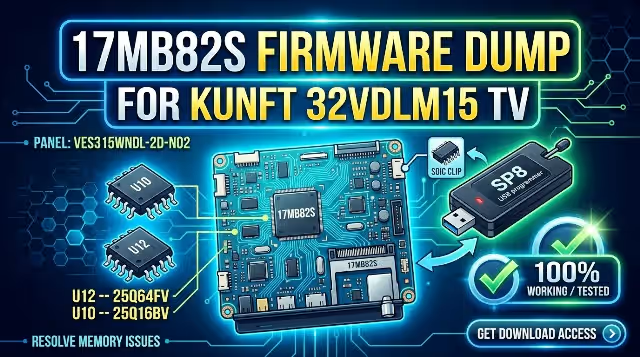
Below is the 17MB82S mainboard used in the KUNFT 32VDLM15. Click the image to open a full-resolution view for inspecting component layout and SPI chip positions.
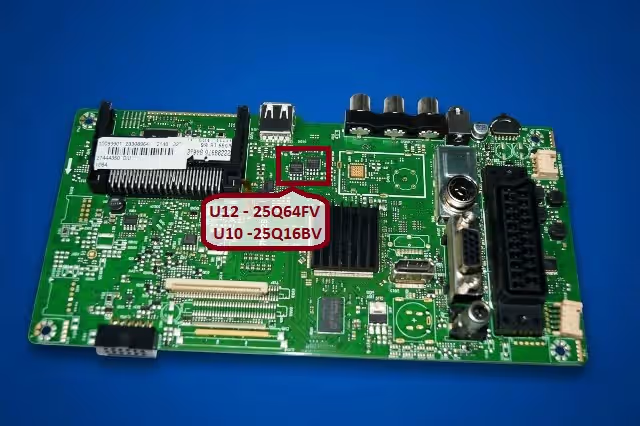
SPI Flash Chip Location
The image below highlights the exact positions of U12 (25Q64FV) and U10 (25Q16BV) on the 17MB82S board. Use this reference to locate the chips before desoldering.
Common Issues – KUNFT 32VDLM15
The following symptoms indicate corrupted SPI memory on the 17MB82S mainboard and can be resolved by flashing the correct firmware dump:
- TV stuck on boot logo and does not proceed to home screen
- Standby LED blinks repeatedly but TV never powers on
- Screen remains completely black with no backlight activity
- TV turns on briefly then shuts off after 2-3 seconds
- No audio and no video output on any input source
- Firmware update via USB fails or freezes midway
- Main board does not initialize – no response to remote or buttons
- HDMI CEC and all smart features become unresponsive
- Random reboot loop – TV restarts continuously
Diagnostic & Repair Protocol
Follow this professional step-by-step procedure to successfully flash the SPI memory and restore your KUNFT 32VDLM15 to factory working condition:
- Disassemble the TV: Remove the back panel screws and carefully separate the back cover. Disconnect all ribbon cables and connectors from the 17MB82S mainboard.
- Identify SPI Chips: Locate U12 (25Q64FV – 8MB) and U10 (25Q16BV – 2MB) on the mainboard using the reference image above.
- Desolder the Target Chip: Using a hot air rework station at 350-380 degrees Celsius, carefully desolder the SPI chip. Apply flux generously to protect surrounding components.
- Backup Original Data: Place the chip in your SP8 programmer, select the correct chip model, and read the existing firmware. Save this backup file securely before proceeding.
- Erase the Chip: Perform a full erase operation on the SPI chip to clear all corrupted data blocks.
- Flash the New Dump: Load the downloaded firmware dump file into the SP8 software and write it to the chip. Wait for the verification pass to confirm successful programming.
- Resolder the Chip: Apply fresh solder paste to the pads, position the chip with correct pin-1 orientation, and reflow using the hot air station.
- Reassemble and Test: Reconnect all cables, secure the mainboard, and attach the back cover. Power on the TV and verify full functionality including all inputs, audio, and menu access.
Video Repair Guide
Watch the detailed video tutorial below for a visual walkthrough of the complete firmware flashing procedure on the 17MB82S mainboard:
Download Firmware Dump
KUNFT 32VDLM15 – 17MB82S SPI Firmware Dump
Contains verified dump files for U12 (25Q64FV) and U10 (25Q16BV). Compatible with SP8 programmer.
Click the button to proceed. A sponsor page will open first, then your download will begin.