

 Technician Only
100% Tested
Technician Only
100% Tested
5800-A3M12G-0P00 Firmware Dump for Tornado 43EL7410A – SPI 25GD64 Memory Repair Download
Firmware Overview
This page provides the verified SPI memory dump for the Tornado 43EL7410A television equipped with the 5800-A3M12G-0P00 main board. The firmware targets the 25GD64 SPI flash memory chip and is designed to resolve critical boot failures, corrupted EEPROM data, and various software-related malfunctions that prevent normal TV operation.
The dump file has been extracted from a fully functional unit, verified for data integrity, and tested on multiple boards to ensure 100% compatibility and reliability. Use the RT809H universal programmer with an SOP8 clip or socket adapter for proper flashing.
Technical Specifications
| Brand | Tornado |
|---|---|
| Model | 43EL7410A |
| Main Board | 5800-A3M12G-0P00 |
| Panel | RDL430FY-LD0-70D |
| SPI Flash Memory | 25GD64 (64Mbit / 8MB) |
| Programmer | RT809H Universal Programmer |
| File Type | Full SPI Dump (.bin) |
| Status | 100% Tested & Working |
Known Issues This Firmware Resolves
The following symptoms on the Tornado 43EL7410A with 5800-A3M12G-0P00 board indicate SPI memory corruption requiring a firmware reflash:
Diagnostic and Repair Protocol
Follow this systematic protocol to diagnose and repair the Tornado 43EL7410A using the SPI firmware dump method:
Phase 1: Initial Diagnosis
Visual Inspection
Examine the 5800-A3M12G-0P00 main board for visible damage including burnt components, swollen capacitors, cracked solder joints, and damaged traces around the SPI memory area.
Power Supply Verification
Measure all output voltages from the power supply board: 12V, 5V, and 3.3V standby. Confirm the main board receives proper voltage rails before proceeding with software diagnosis.
SPI Chip Identification
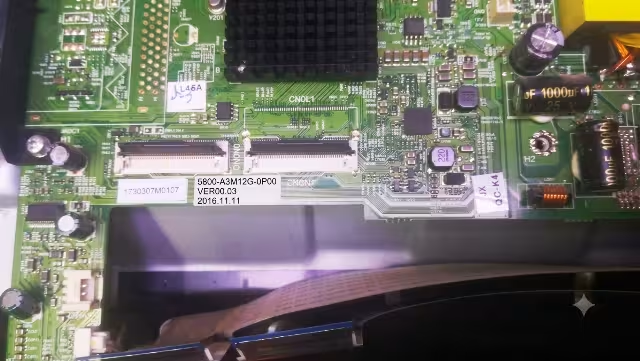
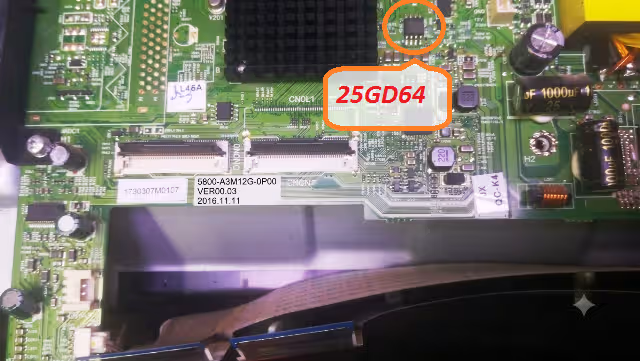
Locate the 25GD64 SPI flash memory chip on the main board. It is an 8-pin SOP8 package typically positioned near the main processor IC. Verify the part number marking on the chip.
Phase 2: Firmware Extraction and Backup
Desolder the SPI Chip
Using a hot air rework station set to 340-360 degrees Celsius with medium airflow, carefully desolder the 25GD64 chip. Apply flux generously and use tweezers to lift the chip once solder melts. Alternatively, use an SOP8 test clip for in-circuit reading if supported.
Read Existing Firmware
Place the 25GD64 into the RT809H programmer socket adapter. Open the RT809H software, select the correct chip model (GD25Q64 or equivalent), and perform a full read operation. Save this as a backup file even if data appears corrupted.
Phase 3: Flash New Firmware
Erase the Chip
Execute a full chip erase operation to clear all sectors of the 25GD64 memory. Verify the erase was successful by performing a blank check, confirming all bytes read as 0xFF.
Write the Firmware Dump
Load the downloaded 5800-A3M12G-0P00 firmware dump file into the RT809H software. Execute the write operation and wait for completion without interruption. The process typically takes 2 to 4 minutes.
Verify Written Data
After writing, perform a verify operation to compare the chip contents against the original firmware file. The verification must show zero errors for a successful flash. If errors are detected, repeat the erase and write cycle.
Phase 4: Reassembly and Testing
Resolder the SPI Chip
Apply fresh solder paste to the PCB pads, position the 25GD64 chip with correct pin 1 orientation, and reflow using the hot air station at 340 degrees Celsius. Inspect all 8 pins under magnification for proper solder joints and no bridges.
Functional Test
Reconnect all cables to the main board (LVDS panel cable, power supply, speaker, IR sensor). Power on the TV and verify: normal boot sequence, logo display, home screen access, all input sources, audio output, and remote control response.
SPI Memory Chip Location
Video Tutorial
Watch the complete step-by-step guide for flashing the 5800-A3M12G-0P00 firmware dump on the Tornado 43EL7410A using the RT809H programmer:
Download Firmware Dump
5800-A3M12G-0P00 | SPI 25GD64 | Tornado 43EL7410A | Full Dump File
Step 1: Click opens a sponsor page in a new tab. Step 2: Click again to start the direct download.
Share This Firmware
Frequently Asked Questions
What issues does this firmware fix on Tornado 43EL7410A?
This firmware resolves boot loops, stuck on logo, black screens with backlight, no signal output on all inputs, dead TV after power surge, EEPROM data corruption, continuous standby LED blinking, and panel initialization failures on the Tornado 43EL7410A with the 5800-A3M12G-0P00 main board.
Which programmer is required for the 25GD64 SPI chip?
The RT809H universal programmer with an SOP8 socket adapter or SOP8 test clip is required to read, erase, and write the 25GD64 SPI flash memory chip. Ensure you have the latest version of the RT809H software installed for proper chip recognition.
Is this firmware tested and safe to use?
Yes, this firmware dump has been extracted from a working unit and tested on multiple Tornado 43EL7410A televisions with the 5800-A3M12G-0P00 main board and RDL430FY-LD0-70D panel. It is verified 100% working with zero data errors.
Can I use an SOP8 clip instead of desoldering?
In-circuit programming with an SOP8 test clip may work if the main board circuit does not interfere with SPI communication. However, for the most reliable results, desoldering the 25GD64 chip is recommended to avoid read/write errors caused by parallel components on the bus.
What if the TV still does not work after flashing?
If the TV fails to boot after a successful firmware flash with verified data, check for additional hardware faults: failed main processor, damaged LVDS connector, defective power supply capacitors, or panel backlight driver failure. The SPI firmware addresses software-level issues only.


