

 FOR TECHNICIANS ONLY
TESTED 100%
FOR TECHNICIANS ONLY
TESTED 100%
Firmware Overview
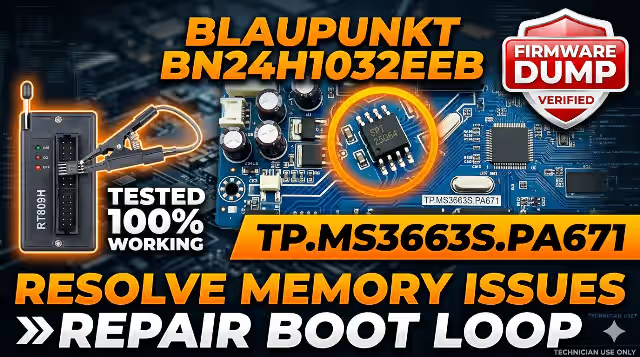
This page provides a tested and verified SPI memory dump for the TP.MS3663S.PA671 main board installed in the Blaupunkt BN24H1032EEB television. If your TV suffers from memory corruption, boot loop, stuck logo, or a completely dead state after a power surge, this firmware file is the solution. The dump targets the 25Q64 SPI flash chip and must be programmed using the RT809H universal programmer.
This resource is intended exclusively for qualified TV repair technicians who understand SPI flash programming procedures. Incorrect flashing can render the board permanently unusable.
Hardware Specifications
| Brand | Blaupunkt |
| Model | BN24H1032EEB |
| Main Board | TP.MS3663S.PA671 |
| Display Panel | CX236DLEDM |
| SPI Flash IC | 25Q64 (64Mbit / 8MB) |
| Programmer | RT809H Universal Programmer |
| Firmware Status | 100% Tested Working |
| File Type | Binary Dump (.bin) |
| Flash Method | SPI Direct / ISP Header |
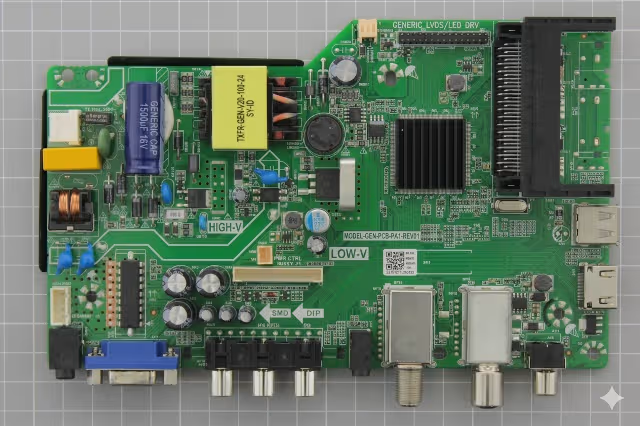
Main Board Reference
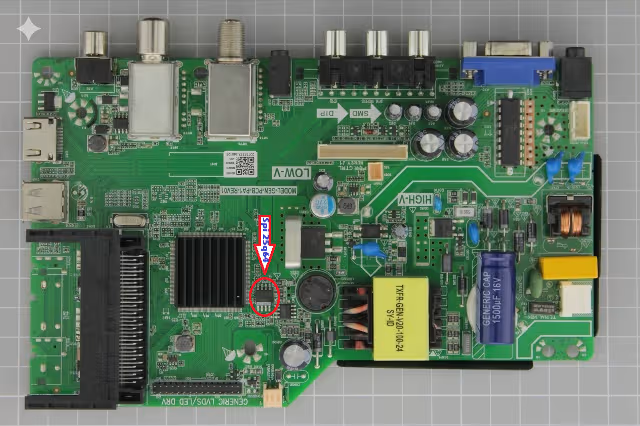
SPI Flash IC Location
Common Issues This Firmware Resolves
The following symptoms on the Blaupunkt BN24H1032EEB indicate SPI memory corruption that requires a fresh firmware dump:
- Stuck on Boot Logo: TV powers on but freezes at the Blaupunkt splash screen and never reaches the home menu.
- Dead TV – No Response: TV shows no signs of life. Standby LED may blink or remain off despite correct power supply voltages.
- Black Screen with Backlight: Backlight turns on but no OSD, no picture, and no audio output from any input source.
- Boot Loop / Auto Restart: TV continuously restarts, showing the logo briefly before powering off and restarting again.
- No Signal on All Inputs: OSD appears but every input port (HDMI, AV, USB) shows “No Signal” despite connected sources.
- Audio Present but No Picture: Sound plays normally from speakers but the screen remains completely black.
- Post Power Surge Failure: TV stopped working after lightning strike, voltage fluctuation, or unstable mains power.
- EEPROM / Firmware Corruption: Software data in the SPI flash has become corrupted, causing erratic behavior or complete failure to boot.
- OSD Menu Freezing: TV boots but the on-screen display menu freezes or responds extremely slowly to remote commands.
- Channel Scan Failure: Auto-tuning process fails, finds zero channels, or crashes the TV during scanning.
Diagnostic and Repair Protocol
Pre-Repair Diagnostics
- Visual Inspection: Examine the TP.MS3663S.PA671 board for burnt components, swollen capacitors, cracked solder joints, or physical damage to the 25Q64 SPI chip.
- Power Supply Verification: Confirm all output voltages from the PSU are within specification (5V standby, 12V main, 3.3V logic). Do not proceed if voltages are abnormal.
- Backlight Test: Verify the LED backlight strips and driver circuit function correctly. Replace faulty LED strips or driver ICs before firmware work.
- SPI Chip Integrity Check: Use the RT809H programmer to attempt reading the existing 25Q64 chip. If the read fails or returns all 0xFF, the chip may need replacement.
Firmware Flashing Procedure
- Desolder the 25Q64 SPI chip from the TP.MS3663S.PA671 board using a hot air rework station at 320 to 350 degrees Celsius. Alternatively, use the ISP header if available on your board revision.
- Place the chip in the RT809H programmer socket adapter (SOP8 to DIP8). Ensure correct orientation by matching pin 1 dot marking.
- Open the RT809H software, select the chip model W25Q64 from the IC database, and verify detection.
- Erase the chip completely using the “Erase” function. Confirm the erase verification passes with no errors.
- Load the downloaded firmware .bin file into the RT809H software buffer using the “Open File” option.
- Write the firmware to the 25Q64 chip using the “Program” function. Wait for the process to complete without interruption.
- Verify the written data by using the “Verify” function to compare the chip contents against the original file. The verification must pass with zero errors.
- Resolder the 25Q64 chip back onto the TP.MS3663S.PA671 board. Inspect solder joints under magnification to ensure no bridges or cold joints exist.
- Reconnect all cables (LVDS panel cable, backlight connector, power supply) and perform a bench test before reassembling the TV chassis.
- Power on and verify: The TV should boot normally to the initial setup screen. Perform a factory reset and channel scan to confirm full functionality.
Post-Repair Validation
- Test all input ports: Verify HDMI, AV, and USB inputs display correctly with appropriate test sources.
- Audio check: Confirm sound output from internal speakers and headphone jack at various volume levels.
- Remote control response: Test all remote control buttons for proper OSD navigation and function execution.
- Thermal stability test: Run the TV for a minimum of 2 hours continuously to confirm stable operation without overheating or shutdown.
Video Tutorial
Watch the complete step-by-step guide for flashing the TP.MS3663S.PA671 firmware using the RT809H programmer:
Download Firmware
TP.MS3663S.PA671 — Blaupunkt BN24H1032EEB — SPI 25Q64 Dump
Programmer: RT809H • Status: Verified Working
DOWNLOAD FIRMWARE
File: TP.MS3663S.PA671_BN24H1032EEB_25Q64.bin • Size: 8MB


