

RSAG7.820.6392 Firmware for HISENSE H55M5500 — USB Recovery Software
Get access to download the magic USB software recovery for resolving any memory issue. Product code HSSO-555502676EU — Full software upgrade/restore via USB.
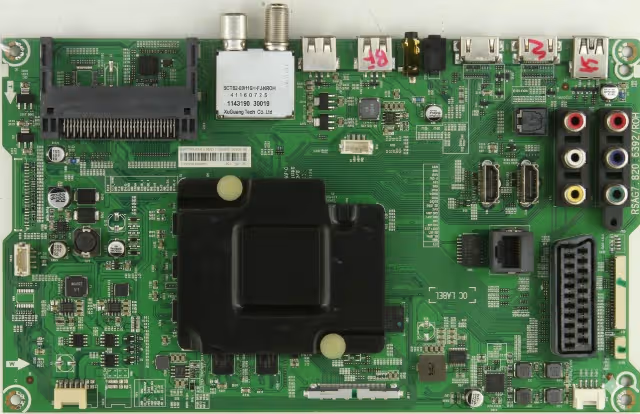
📋 Device Specifications
| Brand | HISENSE |
|---|---|
| Model | H55M5500 |
| Product Code | HSSO-555502676EU |
| Main Board | RSAG7.820.6392 |
| Memory Type | eMMc |
| Programmer Method | USB Update |
| File Name | upgrade_loader.pkg |
| USB Format | FAT32 |
| USB Port | USB 2.0 (White Port) |
| Firmware Status | ✅ Tested 100% Working |
🔍 Common Issues This Firmware Resolves
- TV stuck on logo / boot loop (memory corruption)
- No display, standby light only — eMMc data failure
- Software updating failed / interrupted previous update
- Random reboots or freezing during operation
- Black screen with sound — firmware mismatch
- HDMI ports not detecting source after failed OTA update
- Smart TV features not loading (Netflix, YouTube crash)
- Settings menu inaccessible or corrupted
🛠 Diagnostic & Repair Protocol
Follow this diagnostic sequence before proceeding with the firmware flash. This ensures the main board RSAG7.820.6392 is correctly identified and the issue is software-related — not hardware.
- Visual Inspection: Remove the back cover. Visually inspect the RSAG7.820.6392 main board for burned components, bulging capacitors, or cold solder joints — especially near the eMMc IC and voltage regulators.
- Voltage Rail Check: Using a multimeter, verify 3.3V, 5V, and 12V rails on the main board are stable. Any fluctuation indicates a failing power supply that must be addressed first.
- Standby Test: Plug in the TV and check the standby LED behavior. A blinking pattern may indicate a specific error code. Steady red without response to power button typically signals corrupt bootloader.
- UART Serial Log: Connect a USB-to-TTL adapter to the UART header on RSAG7.820.6392 (115200 baud, 8N1). Capture the boot log — repeated “eMMC read error” or “kernel panic” confirms firmware corruption requiring reflash.
- USB Recovery Flash: If diagnostics confirm software failure, proceed with the USB firmware recovery procedure detailed below.
- Post-Flash Verification: After successful update, run the TV for 30+ minutes. Access all inputs (HDMI 1–3, USB media), test smart apps, and verify audio output. Check the service menu for any residual error logs.
📥 USB Firmware Update Instructions
- Format a USB stick as FAT32 (capacity 4–32 GB recommended).
- Copy the file
upgrade_loader.pkgto the root of the empty USB stick. - Safely eject the USB stick from your computer.
- Insert the USB stick into a USB 2.0 port (white) on the TV.
- While holding down the POWER button on the remote control, plug in the power cord.
- Continue holding the POWER button until the update starts.
- A message “Software Updating…” will appear on screen.
- When the update finishes, the TV will restart automatically.
⚠ Do NOT disconnect power during the update. The process may take 5–15 minutes. If the TV does not restart automatically after 20 minutes, manually power cycle and retry.
⬇ Download Firmware File
RSAG7.820.6392 — HISENSE H55M5500
File: upgrade_loader.pkg — USB Recovery Software
2-Step Download: Click once → view sponsor link → click again for real file
🎥 Firmware Update Video Guide
📺 Step-by-step firmware recovery tutorial for RSAG7.820.6392


