

RSAG7.820.6392 Firmware
HISENSE H49M3000 USB Software
Memory TV Firmware Dump & Repair — Download Tested & Verified upgrade_loader.pkg
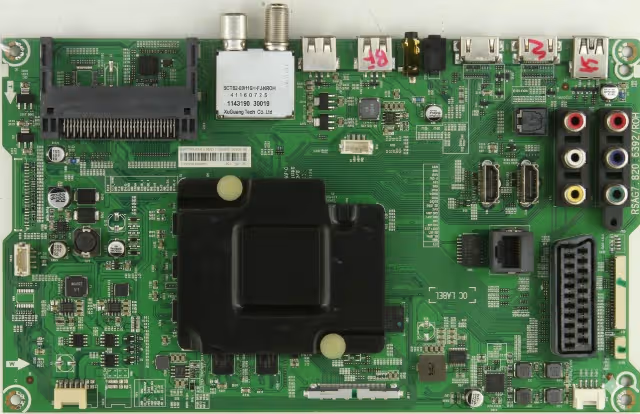 RSAG7.820.6392 — MAIN BOARD
Firmware Overview
Get access to download the magic USB software for the RSAG7.820.6392 main board, designed to resolve any memory issue on the HISENSE H49M3000 television. This is a complete Memory firmware dump — tested and verified 100% working — for technicians needing to upgrade or restore the TV software via USB method.
Product code: HSSO-49300629EU. This firmware package contains the full upgrade_loader.pkg file required for a clean USB recovery installation.
Specifications
| Brand | HISENSE |
|---|---|
| Model | H49M3000 |
| Product Code | HSSO-49300629EU |
| Main Board | RSAG7.820.6392 |
| Update Method | USB Update (upgrade_loader.pkg) |
| USB Port Required | USB 2.0 (White Port) |
| USB Format | FAT32 |
| Firmware Status | Tested — 100% Working |
USB Update Procedure
Follow these steps carefully to upgrade or restore the software on your HISENSE H49M3000 using the RSAG7.820.6392 firmware:
- Download the firmware file
upgrade_loader.pkgfrom the download section below. - Format an empty USB stick to FAT32 file system.
- Copy the file
upgrade_loader.pkgto the root directory of the USB stick (do not place it inside any folder). - Insert the USB stick into a USB 2.0 port (white-colored port) on the TV.
- Disconnect the TV power cord from the wall outlet.
- While holding down the power button on the remote control, insert the power cord back into the wall outlet. Continue holding the power button until the update process starts.
- A message “Software Updating” will appear on the screen. Do not unplug the TV or remove the USB during this process.
- When the update is finished, the TV will restart automatically. Remove the USB stick after restart.
Common Issues Resolved
The RSAG7.820.6392 firmware for HISENSE H49M3000 addresses the following known issues:
- TV stuck on boot loop (Hisense logo repeating)
- Black screen after power on — no display
- Frozen on startup logo — unresponsive
- eMMc flash memory corruption
- No signal on all HDMI inputs
- WiFi & Bluetooth module not detected
- Backlight on but no image or OSD
- Audio output with no video (sound only)
- Automatic shutdown / random reboots
- Software brick after failed OTA update
- Smart TV apps crashing or not loading
- Remote control input not responding
Diagnostic & Repair Protocol
Pre-Repair Diagnostics
- Visual Inspection: Check main board RSAG7.820.6392 for burnt components, swollen capacitors, or cracked solder joints before attempting firmware update.
- Voltage Verification: Confirm power supply outputs (5V, 12V, 24V standby) are within specification before applying firmware.
- eMMc Status: If USB update fails, the eMMC flash chip may require direct programming via RT809H programmer with the provided eMMc dump file.
- Backlight Test: Verify LED backlight strips are functional. Firmware update will not resolve hardware-level backlight failure.
Post-Update Verification
- Factory Reset: After successful firmware installation, perform a factory reset from Settings → System → Reset to ensure clean configuration.
- HDMI & Input Test: Verify all HDMI ports, USB ports, and antenna input are operational after update.
- Network Test: Confirm WiFi and Ethernet connectivity. Re-enter network credentials if required.
- Firmware Version: Navigate to Settings → About → Software Version to confirm the update was applied correctly.
Video Tutorial
Download Firmware
File: upgrade_loader.pkg (eMMc Full Soft)
Board: RSAG7.820.6392 — HISENSE H49M3000
Method: USB Update · FAT32 · USB 2.0 Port
Click once to proceed — download will begin on second confirmation.


