Firmware Overview
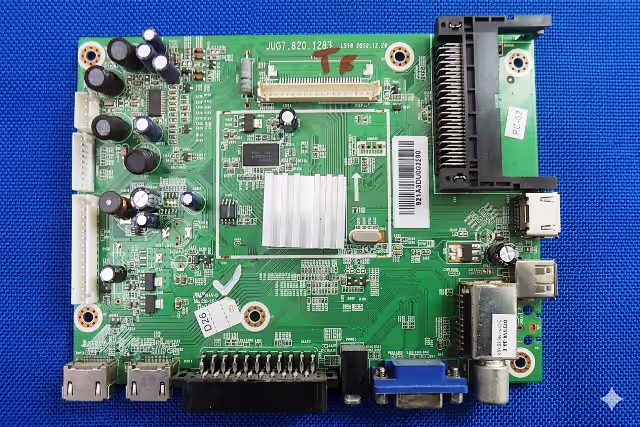
This page provides the verified Jug7.820.1283 firmware dump for the Changhong EC29H4N television. The EEPROM bin file targets the SPI 25Q32 flash memory mounted on the Jug7.820.1283 universal main board. This dump has been extracted, cleaned, and tested to resolve critical memory corruption issues commonly found on this model.
Whether you are dealing with a no power condition, boot loop, or stuck on logo scenario, reflashing the SPI memory with this verified dump restores the TV to full factory-operational state. The firmware is designed for professional technicians using the RT809H universal programmer.
Technical Specifications
| Brand | Changhong |
|---|---|
| Model | EC29H4N |
| Main Board | Jug7.820.1283 |
| Panel Type | HD Panel |
| SPI Flash IC | 25Q32 (32Mbit / 4MB) |
| Dump Size | 4 MB (4,194,304 bytes) |
| Programmer | RT809H Universal Programmer |
| Firmware Status | Tested and Verified 100% Working |
| File Format | .bin (Binary Dump) |
SPI Flash IC Location
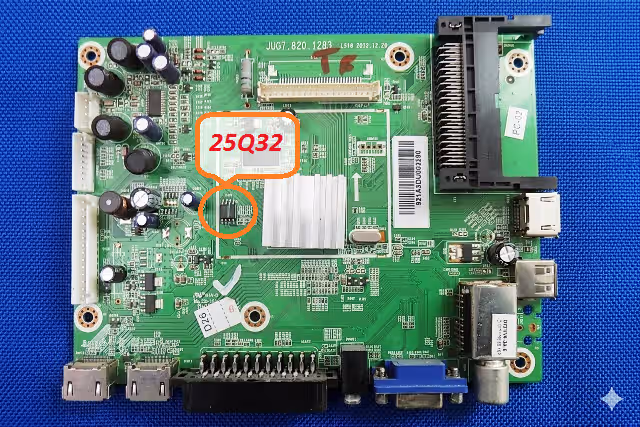
Locate the 25Q32 SPI flash memory on the Jug7.820.1283 main board. The chip is typically positioned near the main processor. Use the reference image below to identify the exact location before desoldering or using an in-circuit clip with the RT809H programmer.
Common Issues Resolved by This Firmware
The following symptoms on the Changhong EC29H4N with Jug7.820.1283 main board are directly linked to corrupted SPI flash data. Reflashing with this dump resolves each condition.
No Power / Dead Set
TV does not respond to power button or remote. Standby LED may or may not illuminate. Caused by corrupted boot sector in SPI memory.
Boot Loop / Restart Cycle
TV powers on, shows logo briefly, then restarts continuously. Firmware initialization fails due to damaged configuration data blocks.
Stuck on Logo Screen
Changhong logo appears but TV never reaches the home screen or input source. Main firmware image is partially corrupted.
Backlight On, No Display
Screen lights up with backlight but shows no image, no OSD menu. Panel initialization parameters in EEPROM are corrupted.
No HDMI / No AV Signal
All input ports unresponsive. HDMI, AV, and USB inputs fail to detect connected devices. Input routing table corrupted.
No Audio Output
Picture displays correctly but no sound from internal speakers or audio output. Audio codec initialization data lost.
Channel Search Failure
Auto-scan finds no channels. Tuner configuration and frequency tables in EEPROM are overwritten or missing.
Software Update Failure
USB software update hangs or fails. Previous firmware update attempt left the SPI flash in an inconsistent state.
Diagnostic and Repair Protocol
Follow this professional repair protocol to diagnose and resolve memory-related issues on the Changhong EC29H4N using the Jug7.820.1283 main board firmware dump.
Pre-Repair Diagnostics
Firmware Flashing Procedure
Video Tutorial
Watch the complete step-by-step firmware flashing guide for the Jug7.820.1283 main board. This tutorial demonstrates the full process from SPI chip removal through RT809H programming to final verification.
Download Firmware Dump
File: Jug7.820.1283_Changhong_EC29H4N_25Q32.bin | Size: 4 MB | Programmer: RT809H
Related Firmware Downloads
Frequently Asked Questions
What programmer is required for Jug7.820.1283 firmware?
The RT809H universal programmer is required to read and write the SPI 25Q32 flash memory on the Jug7.820.1283 main board. Use the SOP8 adapter or in-circuit test clip for connection. Ensure you have the latest RT809H software installed for proper IC detection.
Is this firmware tested and safe to use?
Yes, this firmware dump has been tested 100% working on the Changhong EC29H4N with HD panel configuration. The dump was extracted from a fully functional unit, verified for data integrity, and confirmed across multiple repair cases before publication.
What issues does this firmware fix?
This firmware resolves no power, boot loop, stuck on logo, no display with backlight on, HDMI/AV not working, no audio, channel search failure, and corrupted EEPROM data issues specific to the Jug7.820.1283 main board.
Can I use this dump with a different panel?
This firmware is configured for the HD panel used in the Changhong EC29H4N. Using it with a different panel resolution or type may result in display issues. Panel-specific parameters such as LVDS configuration, gamma tables, and timing data are embedded in the dump. Contact us if you need a modified version for a different panel.
Do I need to desolder the SPI chip?
Desoldering provides the most reliable connection for programming. However, you can attempt in-circuit programming using an SOP8 test clip connected to the RT809H. Ensure the main board is completely powered off and disconnected from mains supply before clipping onto the IC.