Overview
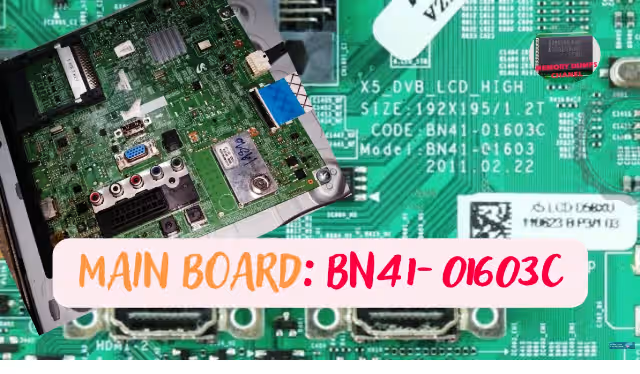
The BN41-01603C is a widely used main board found in the Samsung LE32D550 LCD television. When the onboard 24C256 EEPROM becomes corrupted, the TV exhibits critical failures ranging from boot loops to complete power-on failure. This article provides a tested and verified firmware dump for the EEPROM memory chip, enabling professional technicians to restore full functionality using the RT809H universal programmer.
This dump file is specifically matched to the LTF320HN01 panel. Writing this firmware to a replacement or existing 24C256 chip resolves all memory-related faults on this board revision. The file has been extracted from a fully operational unit and validated across multiple repairs.
Firmware Specifications
| Brand | Samsung |
|---|---|
| Model | LE32D550 |
| Main Board | BN41-01603C |
| Panel | LTF320HN01 |
| EEPROM Chip | 24C256 |
| Programmer Method | RT809H Universal Programmer |
| File Format | SPI / BIN Dump |
| Firmware Status | Tested 100% Working |
EEPROM Chip Location
The 24C256 EEPROM is located near the main processor on the BN41-01603C board. Refer to the image below for exact positioning. The chip must be desoldered or read in-circuit using the RT809H with appropriate clip adapters.
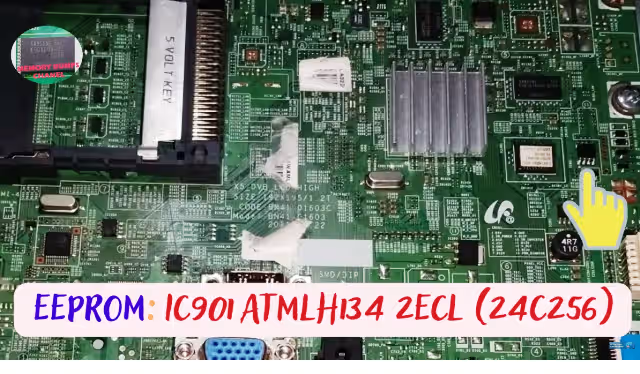
EEPROM 24C256 location on BN41-01603C main board – Samsung LE32D550
Known Issues – BN41-01603C
When the EEPROM memory on the BN41-01603C board fails or becomes corrupted, the Samsung LE32D550 may exhibit one or more of the following symptoms:
- TV stuck on Samsung logo — does not progress past boot screen
- No power — standby LED does not illuminate, board unresponsive
- Standby mode only — red LED on but TV will not turn on
- No picture — sound plays normally but screen remains black
- HDMI ports not detected — all external inputs fail to register
- Continuous restart loop — TV powers on and off repeatedly
- Main board boot failure — no activity after power supply confirmed OK
- Distorted OSD menu — on-screen display shows corrupted characters
- Factory reset fails — unable to restore default settings via service menu
Diagnostic & Repair Protocol
Follow this systematic procedure to diagnose the EEPROM fault and successfully write the firmware dump to the 24C256 chip on the BN41-01603C board:
- Visual Inspection — Examine the BN41-01603C board for burnt components, swollen capacitors, or damaged traces around the EEPROM area.
- Power Supply Verification — Confirm standby voltage (5V) and main voltage (12V/24V) outputs are within tolerance before suspecting memory failure.
- Identify the EEPROM — Locate the 24C256 chip using the reference image above. Verify part markings match AT24C256 or compatible variant.
- Desolder or Clip — Either desolder the 24C256 using hot air at 320°C or attach an SOP8 test clip for in-circuit programming via RT809H.
- Read Existing Data — Before writing, read the current EEPROM contents and save a backup. This allows comparison and rollback if needed.
- Write Firmware Dump — Load the downloaded SPI dump file into the RT809H software. Select IC type 24C256 and execute the write operation.
- Verify Write — After writing, perform a verify operation to ensure the data was written correctly with zero errors.
- Resolder & Test — If desoldered, carefully resolder the EEPROM to the board. Reconnect the panel, power supply, and test the TV for normal boot and operation.
- Final Validation — Navigate all inputs (HDMI, USB, AV), check OSD menu functionality, and confirm audio/video output on the LTF320HN01 panel.
Video Repair Guide
Watch the complete step-by-step firmware dump and repair procedure for the BN41-01603C main board. This video covers EEPROM identification, desoldering technique, RT809H programming, and final testing on the Samsung LE32D550.
Download Firmware Dump
BN41-01603C EEPROM 24C256 – SPI Dump File
Samsung LE32D550 | Panel: LTF320HN01 | Verified Working
Click the button. A new tab will open first — then you will be redirected to the direct download link automatically.
Frequently Asked Questions
What EEPROM chip is used on the BN41-01603C main board?
The BN41-01603C main board uses a 24C256 EEPROM chip for storing firmware and configuration data. It is an 8-pin SOP package typically located near the main processor IC.
Which programmer is recommended for the BN41-01603C EEPROM dump?
The RT809H universal programmer is recommended for reading and writing the 24C256 EEPROM on the BN41-01603C board. It supports both in-circuit and off-board programming via SOP8 clip or socket adapter.
What issues does the BN41-01603C firmware dump resolve?
This firmware dump resolves issues including TV stuck on Samsung logo, no power or standby mode failure, no picture with sound only, HDMI ports not working, repeated restart loop, and main board boot failure.