Bn41-01603b Firmware Dump for Samsung Le40d550k1w – EEPROM 24c256 Memory Repair Download
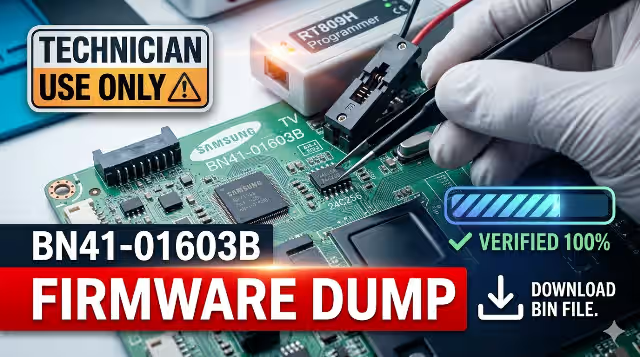
This firmware dump provides a fully tested EEPROM backup for the Samsung Le40d550k1w television equipped with the Bn41-01603b main board. The dump targets the 24c256 EEPROM memory IC, which stores critical boot configuration, channel data, and system parameters. When this chip becomes corrupted, the TV exhibits a range of failure symptoms that can only be resolved through reprogramming with a verified dump file using the RT809H universal programmer.
Firmware Specifications
| Parameter | Details |
|---|---|
| Brand | Samsung |
| Model | Le40d550k1w |
| Main Board | Bn41-01603b |
| Panel | LTF400HM03 |
| EEPROM IC | 24c256 |
| Programmer | RT809H Universal Programmer |
| Dump Type | EEPROM Memory Dump (SPI File) |
| File Status | Tested 100% Working |
| Compatibility | Bn41-01603b boards with LTF400HM03 panel only |
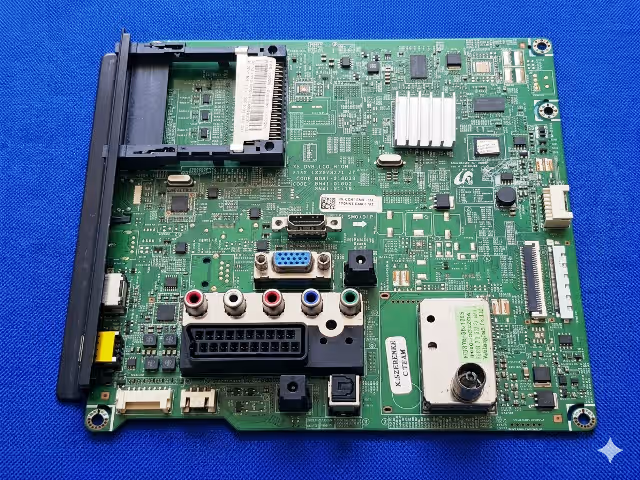
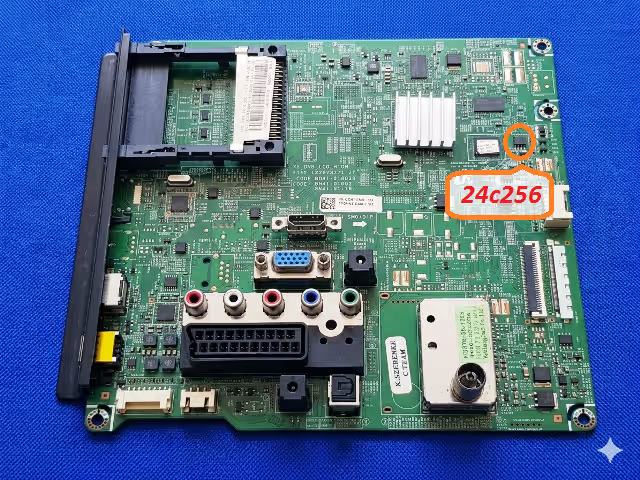
EEPROM Location on Bn41-01603b
Common Issues Resolved by This Firmware
- Stuck on Samsung Logo: TV powers on, displays the Samsung boot logo, and freezes without progressing to the home screen or input source.
- No Boot / Dead State: Standby LED turns on but the TV refuses to start. Main board receives power but EEPROM corruption prevents initialization.
- Continuous Restart Loop: TV turns on and off repeatedly in a cycle due to corrupted boot parameters stored in the 24c256 EEPROM.
- Backlight On, No Picture: Panel backlight illuminates normally but no image appears. OSD menu does not load due to EEPROM read failure.
- HDMI / AV No Signal: All input sources display “No Signal” even though external devices are connected and functioning.
- Sound Without Picture: Audio output works normally but the screen remains black or shows distorted lines.
- Volume / Channel Buttons Unresponsive: Remote control and panel buttons fail to respond due to corrupted system configuration in EEPROM memory.
Diagnostic & Repair Protocol
- Visual Inspection: Remove the back panel of the Samsung Le40d550k1w. Inspect the Bn41-01603b main board for any signs of burnt components, bulging capacitors, or damaged solder joints around the EEPROM area.
- Power Supply Verification: Confirm that the power supply board delivers correct voltages (5V standby, 12V/24V main) to the Bn41-01603b main board before proceeding with EEPROM work.
- Locate the 24c256 EEPROM: Identify the 24c256 EEPROM chip on the Bn41-01603b board. It is an 8-pin SOP package typically located near the main processor IC. Refer to the EEPROM location image above.
- Desolder the EEPROM: Using a hot air rework station set to 320°C with medium airflow, carefully desolder the 24c256 chip. Apply flux paste before heating to protect surrounding components.
- Backup Original Data: Before writing new firmware, place the desoldered 24c256 into an SOP8 adapter connected to the RT809H programmer. Read and save the original dump as a backup file.
- Flash the Firmware Dump: Open the downloaded SPI firmware file in the RT809H software. Select chip type 24c256, click “Erase” to clear the chip, then click “Write” to flash the new firmware. After writing, click “Verify” to confirm data integrity.
- Resolder the EEPROM: Carefully resolder the 24c256 chip back onto the Bn41-01603b main board in the correct orientation. Ensure all 8 pins have clean solder joints with no bridges.
- Reassemble and Power Test: Reconnect all cables, reassemble the TV chassis, and power on the Samsung Le40d550k1w. The TV should boot normally past the Samsung logo and reach the input source screen.
Video Repair Guide
Download Bn41-01603b EEPROM Firmware Dump
Samsung Le40d550k1w • 24c256 • SPI File • RT809H Compatible
Click the button above. A verification page will open first. After verification, click the button again to access the direct download link for the firmware file.
Frequently Asked Questions
The Bn41-01603b main board uses a 24c256 EEPROM memory chip. This is a 256-Kbit (32KB) serial I2C EEPROM in an SOP8 package that stores boot configuration, panel timing parameters, channel lists, and system settings for the Samsung Le40d550k1w television.
The RT809H universal programmer is the recommended tool for reading and writing the 24c256 EEPROM. You will also need an SOP8 to DIP8 adapter socket. The RT809H software includes built-in support for the 24c256 chip with automatic detection capabilities.
No. This firmware dump is specifically configured for the LTF400HM03 panel. Using it with a different panel model may result in display abnormalities such as incorrect resolution, scrambled image, or no picture. Always verify your panel model before flashing.
First, verify the solder joints on the 24c256 chip using a magnifying glass. Check for solder bridges or cold joints. Then re-read the chip using the RT809H and compare the dump with the original file. If data mismatch is found, erase and rewrite the firmware. Also confirm that your main board revision matches Bn41-01603b exactly.