

Published: May 26, 2026
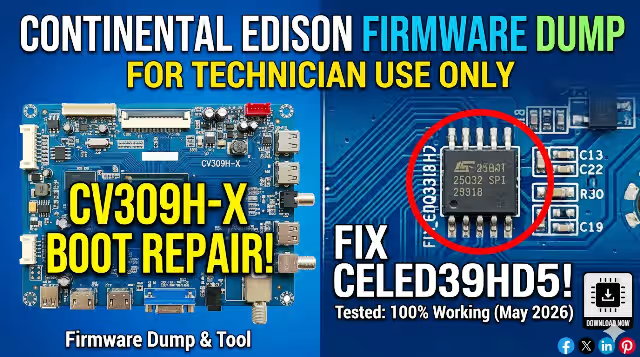
CV309H-X Firmware Dump – Continental Edison CELED39HD5 Free Download
Access the CV309H-X firmware dump for the Continental Edison CELED39HD5 television. This memory dump file provides a complete SPI flash backup extracted from the 25Q32 chip, enabling technicians to resolve critical software-related failures and restore full functionality to the unit. The file has been tested and verified 100% working.
Firmware Specifications
| Brand | Continental Edison |
|---|---|
| Model | CELED39HD5 |
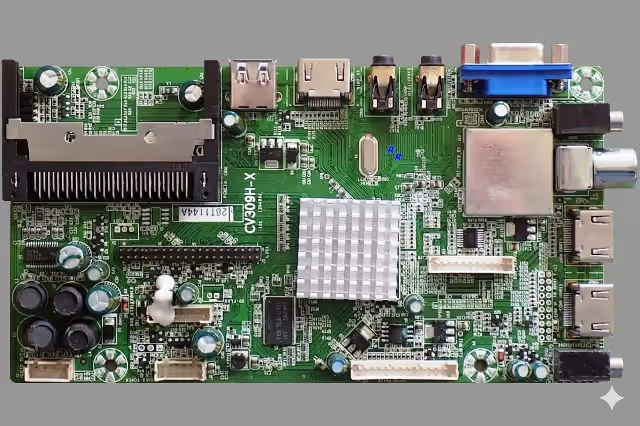
| Main Board | CV309H-X |
| SPI Flash Memory | 25Q32 (32 Mbit) |
| Programmer Method | RT809H |
| File Status | Tested & Verified ✔ |
| Last Updated | May 26, 2026 |
SPI Flash Memory Location
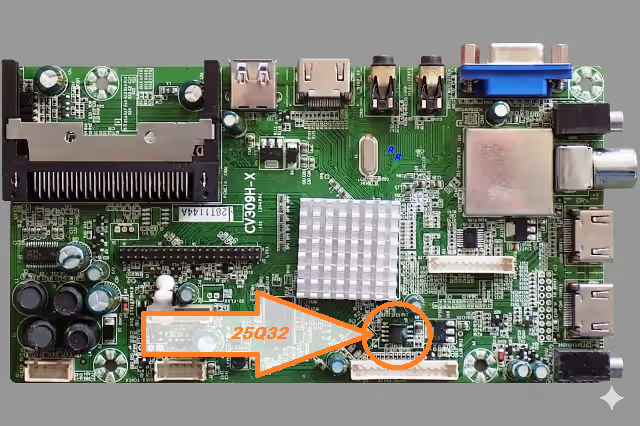
The 25Q32 SPI flash chip is located on the CV309H-X main board as shown in the reference image below. Identify the chip before desoldering or using an in-circuit clip with the RT809H programmer.
Common Issues – Continental Edison CELED39HD5
The following symptoms indicate corrupted or damaged firmware in the CELED39HD5 that can be resolved using this dump file:
- Dead Set / No Power Response: Standby LED does not illuminate, TV shows no signs of life despite good power supply output.
- Stuck on Boot Logo: Continental Edison logo appears on screen but the TV never fully boots to the home screen or input source.
- Endless Reboot Loop: TV powers on, shows logo briefly, then shuts off and restarts continuously.
- No Display / Black Screen with Sound: Audio is functional through speakers but the backlight or video processing fails to initialize.
- No Signal on All Inputs: HDMI, AV, USB, and antenna inputs show “No Signal” even when sources are properly connected.
- Frozen on Screen / System Hang: TV boots but freezes on a static image and does not respond to remote or panel buttons.
- OSD Menu Corruption: On-screen display shows garbled text, missing icons, or incorrect language that cannot be reset.
- Sound but No Backlight: TV appears off but audio plays normally, indicating a firmware-driven backlight enable failure.
- Software Update Failure: A failed USB or OTA firmware update has bricked the system, requiring SPI reflash.
- Remote Control Unresponsive: IR receiver functional at hardware level but firmware fails to process key commands.
Diagnostic & Repair Protocol
Follow this step-by-step procedure to diagnose and repair the Continental Edison CELED39HD5 using the CV309H-X firmware dump:
- Step 1 – Visual Inspection: Open the TV back panel. Inspect the CV309H-X main board for burnt components, swollen capacitors, or damaged traces around the power regulation and SPI flash areas.
- Step 2 – Power Supply Verification: Using a multimeter, verify all voltage outputs from the power supply board (5V, 12V, 24V). Confirm standby voltage reaches the main board before proceeding with firmware repair.
- Step 3 – Identify the SPI Flash Chip: Locate the 25Q32 SPI flash memory on the CV309H-X board. The chip is typically an 8-pin SOIC package marked with “25Q32” or equivalent part number.
- Step 4 – Desolder or Clip the SPI Chip: For best results, desolder the 25Q32 chip using a hot air station at 300–350°C. Alternatively, use a SOIC8 test clip for in-circuit reading/writing with the RT809H.
- Step 5 – Read Existing Firmware (Backup): Connect the chip to the RT809H programmer. Select the correct chip model (W25Q32 or equivalent). Read the existing firmware and save it as a backup before writing new data.
- Step 6 – Write the Dump File: Load the downloaded CV309H-X firmware dump file into the RT809H software. Erase the chip completely, then write the new firmware. Verify the write operation by comparing the written data with the source file.
- Step 7 – Resolder & Reassemble: If desoldered, resolder the SPI chip back to the main board. Ensure all solder joints are clean and properly connected. Reassemble the TV.
- Step 8 – Power-On Test: Connect the TV to mains power. Confirm the unit boots past the logo screen, displays OSD correctly, and responds to remote commands. Test all inputs (HDMI, USB, AV, antenna) to verify full functionality.
- Step 9 – Factory Reset (Optional): After successful boot, perform a factory reset from the service menu to clear any residual settings and ensure clean operation.
Video Tutorial – CV309H-X Firmware Repair
Watch the complete firmware dump and repair procedure for the Continental Edison CELED39HD5 with the CV309H-X main board:
Download Firmware Dump File
CV309H-X – CELED39HD5 Dump File
Main Board: CV309H-X | SPI: 25Q32 | Programmer: RT809H
Click Step 1 first to unlock the download link


