

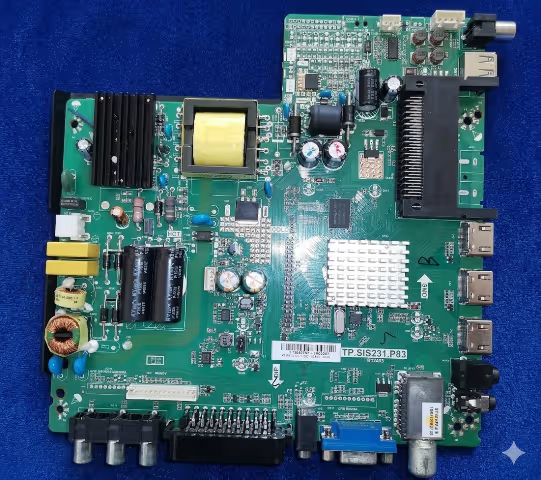
GRANDIN LED32TC1700E Firmware Dump – TP.SIS231.P83 SPI Download
Get access to download the magic SPI dump for the GRANDIN LED32TC1700E television. This firmware dump is designed for the TP.SIS231.P83 main board and resolves any memory-related issue including boot loops, dead screens, firmware corruption, and more. Verified and tested 100% working.
Firmware Specifications
| Brand | GRANDIN |
|---|---|
| Model | LED32TC1700E |
| Main Board | TP.SIS231.P83 |
| LCD Panel | HD RESOLUTION |
| SPI Flash | 25Q32 |
| Programmer | RT809H / USB Update |
| Status | ✓ Tested 100% Working |
| Last Updated |
Main Board & SPI Flash Details
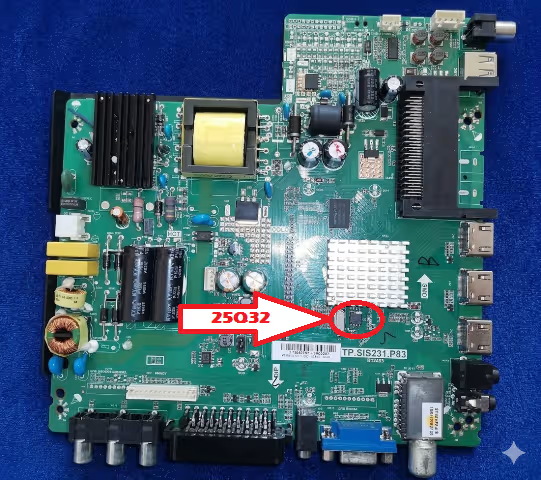
The TP.SIS231.P83 main board integrates the 25Q32 SPI flash chip which stores the entire firmware. If this chip becomes corrupted due to power surge, failed update, or hardware fault — the TV will not boot. Writing a clean magic SPI dump restores full functionality instantly.
Download Firmware
GRANDIN LED32TC1700E – TP.SIS231.P83 – 25Q32 SPI Dump
2-step download: 1st click → ad page & 2nd click → real file
Video Tutorial
Common Issues – GRANDIN LED32TC1700E
- TV stuck on logo / boot loop after power outage
- No display – black screen with backlight on
- White screen / frozen on startup
- Firmware corruption after failed USB update
- HDMI ports not detecting input signals
- No audio output from speakers
- USB port not reading flash drives
- Random restart or automatic shutdown
- Horizontal or vertical lines on LCD panel
- Remote control not responding after boot
Diagnostic & Repair Protocol
- Visual Inspection – Examine the TP.SIS231.P83 main board for burnt components, bulged capacitors, cold solder joints, or water damage marks.
- Power Supply Test – Verify all voltage outputs from the power supply board. Confirm stable 12V, 5V, and 3.3V rails under load.
- Main Board Voltage Check – Measure onboard voltage regulators and LDO outputs on the TP.SIS231.P83 board. Check for short circuits on power rails.
- SPI Flash Backup – Read and save the existing 25Q32 SPI flash content using RT809H programmer before any write operation. Keep the backup safe.
- Firmware Write – Flash the downloaded GRANDIN LED32TC1700E firmware dump to the 25Q32 SPI chip via RT809H programmer. Alternatively, use USB update method if the TV supports it.
- Post-Flash Verification – Reassemble the TV, power on, and verify all functions: display output, audio, HDMI input, USB playback, tuner channels, and remote control response.


