

CV358H-T42 Firmware Dump
HARTENS HTS-43FHD03B-S2
Verified firmware dump for CV358H-T42 main board. Fix your HARTENS HTS-43FHD03B-S2 TV via USB software update — tested 100% working.
Firmware Specifications
Main Board Reference
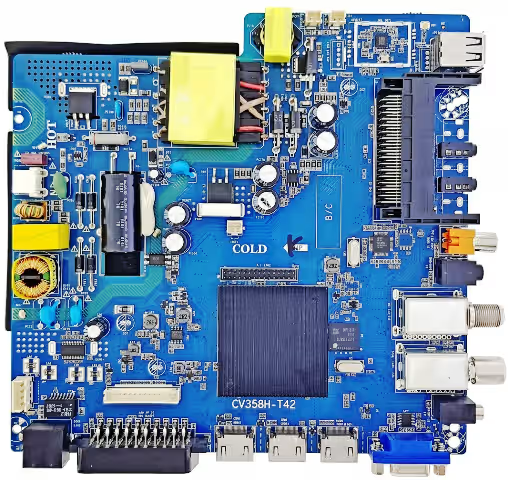
Below is the CV358H-T42 main board used in the HARTENS HTS-43FHD03B-S2. Verify your board matches before flashing the firmware to avoid bricking your device.
Common Issues Resolved by This Firmware
The following known defects on the HARTENS HTS-43FHD03B-S2 (CV358H-T42 board) are resolved with this firmware dump:
- TV stuck on boot logo — endless restart loop
- No picture, backlight ON — black screen with sound
- No signal detected on all input sources (HDMI, AV, USB)
- Software corruption after power surge or failed OTA update
- TV turns ON then immediately shuts OFF (auto-protection trigger)
- Remote control unresponsive — IR receiver not initializing
- Audio output absent — no sound on internal speakers and headphone jack
- Channel tuner not scanning — DVB-T2/S2 tuner failure at software level
- Smart menu freezing or hanging — UI rendering failure
- EEPROM data corruption — factory reset not resolving configuration errors
Diagnostic & Repair Protocol
Before flashing, perform the following diagnostic checks to confirm the issue is firmware-related and not a hardware fault:
| Step | Diagnostic Action | Expected Result | If Failed |
|---|---|---|---|
| 1 | Measure standby voltage at power supply output (5V STB) | 5.0V ± 0.2V present | Replace power supply board or check STB regulator |
| 2 | Check main 12V rail when TV is powered ON | 12V ± 0.5V stable | Inspect power supply capacitors and MOSFETs |
| 3 | Verify backlight LED strips with external tester | All LED bars illuminate evenly | Replace faulty LED strip or backlight driver IC |
| 4 | Check flash memory (eMMc) for read errors | Chip responds to programmer — no blank sections | Replace eMMc flash IC, then re-flash firmware |
| 5 | Inspect LVDS cable connection between main board and panel | Firm connection, no bent pins or corrosion | Reseat or replace LVDS cable |
| 6 | Test with known-good firmware via USB | TV boots normally after flash | Main board IC failure — replace board |
USB Firmware Flashing Procedure
Follow these steps precisely to flash the CtvUpgrade.bin firmware onto the CV358H-T42 main board:
- Download the firmware file CtvUpgrade.bin using the download button below.
- Format a USB flash drive (8GB max recommended) to FAT32 file system. Use a reliable brand (Kingston, SanDisk, etc.).
- Copy the
CtvUpgrade.binfile to the root directory of the USB drive. Do not place it inside any folder. - Power OFF the HARTENS HTS-43FHD03B-S2 TV completely — disconnect the power cable from the wall outlet and wait 30 seconds.
- Insert the USB flash drive into the USB port on the TV’s main board (CV358H-T42).
- Reconnect the power cable and turn ON the TV. The firmware update process will start automatically.
- Wait for the update to complete. The TV screen may flash, show a progress bar, or remain blank during the process. Do NOT unplug the TV or remove the USB drive until the TV restarts on its own.
- Once the TV restarts and displays the initial setup screen, remove the USB drive immediately to prevent a re-flash loop.
- Perform a Factory Reset from the menu: Settings → System → Factory Reset. Reconfigure channels and preferences.
Download Firmware
CV358H-T42 — CtvUpgrade.bin
HARTENS HTS-43FHD03B-S2 • PT430CT02 Panel • Tested ✔
🔒 2-Step Verification: Click once to verify, then click again to download.
Video Tutorial
Watch the complete firmware flashing walkthrough for the CV358H-T42 main board on HARTENS HTS-43FHD03B-S2:
Frequently Asked Questions
The firmware file name is CtvUpgrade.bin. It must be placed in the root directory of a FAT32-formatted USB flash drive. Do not rename the file or place it inside a subfolder.
The HARTENS HTS-43FHD03B-S2 uses the PT430CT02 LCD panel paired with the CV358H-T42 main board. Always verify your panel model before flashing, as mismatched panel firmware can cause display artifacts or permanent panel damage.
Yes, this firmware dump has been tested and verified 100% working on the HARTENS HTS-43FHD03B-S2 with CV358H-T42 board and PT430CT02 panel. It was dumped from a fully functional unit.
The firmware is configured specifically for the CV358H-T42 + PT430CT02 combination. If your TV uses the same main board but a different LCD panel, you may experience resolution mismatch, inverted colors, or no display output. Use at your own risk on non-matching configurations.
Ensure the USB drive is formatted to FAT32 (not NTFS or exFAT). Use a drive 8GB or smaller. Try a different USB port if available. If the issue persists, the USB controller on the main board may be damaged — consider flashing via SPI programmer directly.
Share This Firmware
Related Firmware & Tags
Explore more firmware dumps and repair guides:


